An expiry date is the quietest deadline in an agency. Nothing happens on that day if the renewal went through, and a good deal happens if it did not. Insurance renewal reminder automation exists for the second case.
It does not renew anything. It makes sure the right reminder is drafted at the right time, that a person looks at it, and that a client who stays silent becomes someone’s task, not a line in a report nobody opens.
The loop
The same loop runs every day for every policy with an upcoming expiry date.
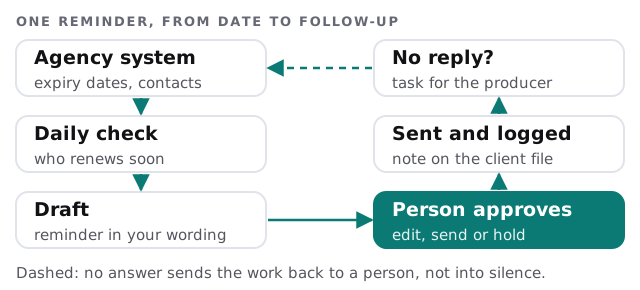
The agency system stays the source of truth. The automation reads from it and writes back to it, so the note that a reminder went out sits on the client file where the next person will look. That matters when the producer who managed the account is out and a colleague picks up the call.
A Tuesday morning
The account manager opens a list of eleven drafts, each tied to a policy renewing soon. She edits two, holds one because the client called yesterday, and approves the rest in about the time it takes to drink a coffee. By afternoon, three clients have replied and one has not. That one is now on Marcus’s task list, with a note saying a reminder went out on Tuesday and nobody has answered.
What a draft is built from
| Field in the draft | Where it comes from | Who checks it |
|---|---|---|
| Client name and contact | The client record | Account manager, once a year |
| Policy type and expiry date | The policy record | A weekly sample check |
| The producer’s name and number | The account owner field | The producer |
| Wording and tone | Your own template | You, before launch |
| Anything about coverage changes | Left blank on purpose | The licensed person |
The last row is deliberate. A reminder that guesses at coverage is a risk. A reminder that says “your policy renews on this date; here is who to call” is a service.
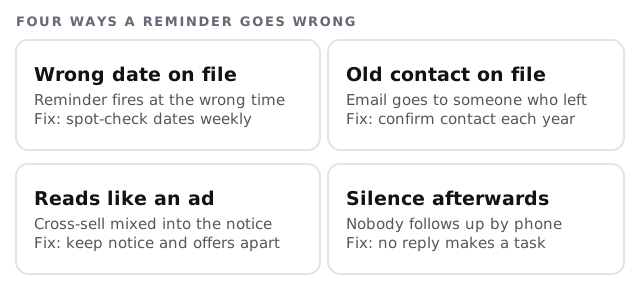
Four ways it goes wrong, and the fix
A note on how reminders are classed
CAN-SPAM is the federal law on commercial email. The FTC’s guide describes a message as transactional or relationship content when it does something like facilitate, complete or confirm a transaction the recipient already agreed to, and warns that the law views these categories narrowly. A message whose subject line suggests an ad, or whose transactional content isn’t at the start, can count as commercial.
For an agency, that means the reminder should read like a reminder. Keep the cross-sell for another message, and have your own counsel look at the template once.
What gets built, in order
- Clean the dates. Agree which field is the expiry date and sample it.
- Write the template. A short one, in your tone, with the producer’s name.
- Set the cadence. The agency decides when the first and later reminders go, per policy type.
- Add the approval step. A person sees every draft before it goes.
- Add the follow-up task for clients who haven’t responded.
- Review after the first renewal cycle: what was sent, what was ignored, what was wrong.
If you are weighing this against a broader project, our page on managed IT for insurance agencies covers the systems side. For connecting forms and CRMs more generally, see website form to CRM automation.
A reminder system succeeds when no client learns about an expiry from a claim denial. Everything else is polish.
What we need from you
- Read access to your agency system’s policy and contact data.
- Your current reminder wording, if any.
- A named person to approve drafts in the first month.