The office was set up around Windows. Then the designer arrived with a MacBook, the marketing lead got one, and last year a partner insisted. Nobody planned the Macs, so nobody looks after them. Mac IT support for small business is the work of bringing those machines under the same rules as everything else, without taking away the thing people like about them.
A Mac that is outside your processes is easy to spot. It has no record, no rules and no wipe if it goes missing.
Same rules, different machines
The goal is not to make a Mac behave like a PC. It is to have one answer to the questions that matter, whatever the machine.
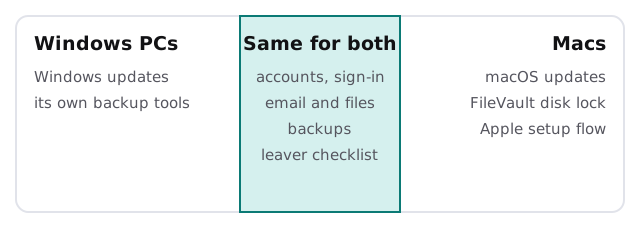
If you already run both, the IT asset tracking page shows how one record can cover every machine, and endpoint protection for small business covers what protects them.
From the box to ready
Apple describes Automated Device Enrollment as designed for all Apple devices that an organization owns. Its stated aim is to let you configure and manage devices from the moment someone removes them from the box. Here is that story in order.
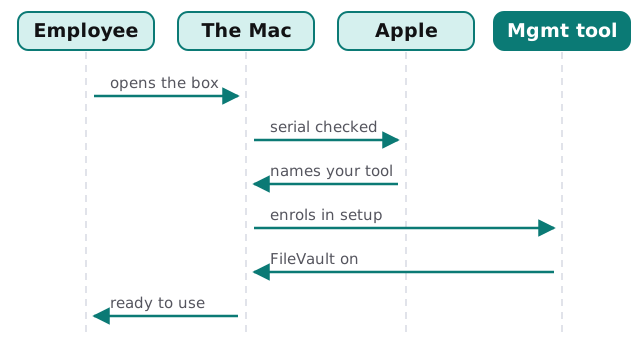
A few points from Apple’s own page are worth knowing.
- The Mac’s serial number has to appear in Apple’s business portal, which the current page calls Apple Business.
- A management service can hold the Mac in Setup Assistant so that critical settings and apps arrive before the user carries on.
- On a Mac with macOS 14 or later, the service can require FileVault to be switched on during setup, so the disk is encrypted before anyone uses it.
- The prevent-unenrollment option applies to supervised devices. On a Mac it blocks removal through System Settings and the profiles command-line tool.
A Mac bought some other way can often be brought in too. Apple’s page notes that devices you did not buy directly can be added manually.
What is genuinely different on a Mac
Updates
macOS has its own update cycle, separate from Windows. Someone has to decide when a business-critical app gets tested against a new release, and not leave it to whoever clicks first.
Encryption
FileVault is the built-in disk encryption. Turning it on at setup is far easier than doing it later with a person’s files already on the disk.
Accounts
A Mac can sign in with a local account or with your work account. Mixed setups cause the oddest support calls, such as a password that works in one place and not another. We pick one approach and apply it to every Mac.
Hardware lifecycle
Macs tend to outlive their usefulness quietly. A register with the purchase date and the macOS version tells you when one will stop getting updates. When you do replace them, see computer migration to new laptops for moving a person’s files across.
Signs your Macs are unmanaged
- Nobody can say how many Macs the business owns.
- Each Mac has a different version of macOS.
- A person’s Apple ID is signed in on a company machine.
- A lost Mac could not be locked or wiped from a distance.
- A leaver kept the laptop and nobody checked what was on it.
On that last point, our checklist for employee onboarding and offboarding IT works the same on any machine.
A Mac is not safer because it is a Mac. It is safer when somebody knows it exists.
What we need from you
- A count of Macs and who uses each one.
- Whether they were bought through a business account or by individuals.
- The Mac-only apps you cannot work without.