Managed IT services for distributors come down to a single question: did every order that arrived today go out on the truck it was meant for? Everything in your IT either helps that or doesn’t. A warehouse has more devices doing real work than most offices, and each one is tied to cash.
An order’s path, and what breaks it
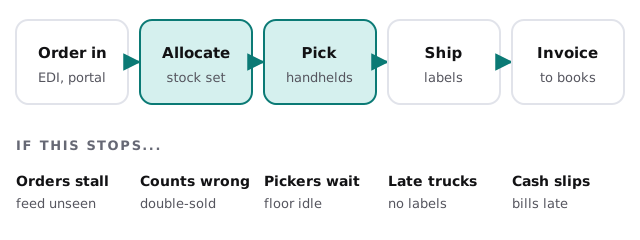
An order enters, stock is allocated, a picker finds it, a label is printed and a truck leaves. Each step relies on a different piece of technology.
Walk the floor
The warehouse is where distributor IT differs most from an office. Metal racking, concrete floors, forklifts and long aisles are hard on wireless signal and on equipment.
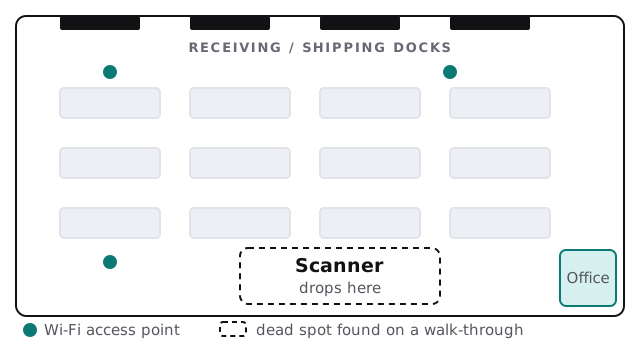
- Walk with a scanner. Follow a pick path and note where it hesitates.
- Map the gaps. Mark them on the floor plan.
- Move or add access points. Place them to fit the racks, not the office.
- Keep scanners on a separate network. Visitors’ phones don’t belong next to the picking system.
- Repeat after any racking change. A rearranged aisle is a new radio environment.
The systems a distributor runs
| System | Role | Typical weak point |
|---|---|---|
| ERP or inventory system | Items, prices, stock, orders, purchasing | One person knows how it’s configured |
| Warehouse management or scanning | Receiving, putaway, picking, cycle counts | Handheld firmware that nobody updates |
| EDI or customer portals | Orders in, shipping notices and invoices out | Failures that don’t raise an alarm |
| Shipping and label software | Carrier labels, tracking, manifests | Printer drivers and labels that change under it |
| Barcode and label printers | Product and shipping labels | One printer shared by the whole bench |
| Accounting and credit | Invoices, collections, vendor payments | Re-keyed from the ERP by hand |
The feeds nobody watches
Customers who send orders electronically are used to them arriving. When a connection fails, orders don’t arrive and nobody sees a flood of errors. They see a quiet inbox, then an angry call. The remedy is dull: a daily check that the expected number of orders came in, with someone named to look at it when it doesn’t.
Peak weeks and cutover weeks
Distributors have busy seasons shaped by their customers, whether that’s a holiday rush, a planting season or a fiscal year-end. Every software update, new scanner or server change should be done well ahead of those weeks, with a plan to roll it back. A change made on a Friday in the busy season is a risk you chose.
Who does the admin today
In most distributors the person who “does IT” is the operations manager, the controller or the one employee who is good with computers. They keep the ERP running, reset passwords, change a printer’s toner and answer the carrier’s portal questions, on top of a day job. That works until they’re out for a week. We take the routine work, such as accounts, updates, backups and the monitoring of connections, so those people can keep running the warehouse and the books.
Receiving, returns and the small devices
The details that get missed are small. Receiving needs a scanner and a label printer at the dock, usually on a cart that moves. Returns need somewhere to scan an item back in without corrupting stock counts. Cycle counts need a handheld that can be taken into any aisle. Each of these is a device, a login and a network connection, and each is a reason to keep a short inventory of what you own: model, location, who uses it and when it was last updated.
What we need from you
- A floor plan, even a rough sketch with the dock doors and racking.
- Your system list, with the vendor and contact for each.
- Your customer connections, and which ones are electronic.
- Your busiest weeks, so we schedule around them.
Monthly care covers access controls, backups and updates. Start with the free IT check, which ends in a plan and a fixed quote.
In a warehouse, IT is judged by the dock: how many orders left today, and whether anyone had to wait for a computer.