Managed IT services for dental offices are judged on a simple test: at 8:30 on a full day, does every chair open the right chart and the right X-ray? Dental offices are unusual because the technology sits in the treatment room. The sensor is in the patient’s mouth, the workstation is at the chair, and a slow network costs you minutes per patient, not per day.
Start with the floor plan
Most dental IT trouble comes from how the pieces connect, not from any one computer. Every chair talks to the same server and the same network, so a single weak point shows up in every room at once.
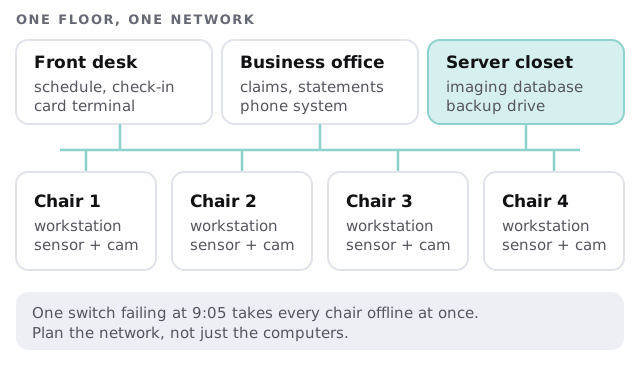
What a dental office runs, and how it fails
| Piece | What it does in your office | A common way it goes wrong |
|---|---|---|
| Practice management software | Charts, schedule, treatment plans, ledgers | One shared login for the whole front desk |
| Imaging software and sensors | Digital X-rays, intraoral photos | Sensor drivers break after a Windows update |
| Panoramic or cone-beam unit | Larger scans written to the image store | The image store runs out of room without warning |
| Insurance and claims tools | Eligibility checks, electronic claims | Passwords kept on a sticky note by the monitor |
| Card terminal and phones | Payments, recall calls | Office Wi-Fi and the phone system share one overloaded router |
What the Security Rule asks of the IT side
If your office sends insurance claims electronically, the HIPAA Security Rule almost certainly covers you, because it applies to health care providers who transmit health information electronically in connection with covered transactions. We explain what the rule requires. We don’t certify anyone, and the program stays yours.
- A risk analysis. The rule says an “accurate and thorough assessment” of risks to electronic patient information is required.
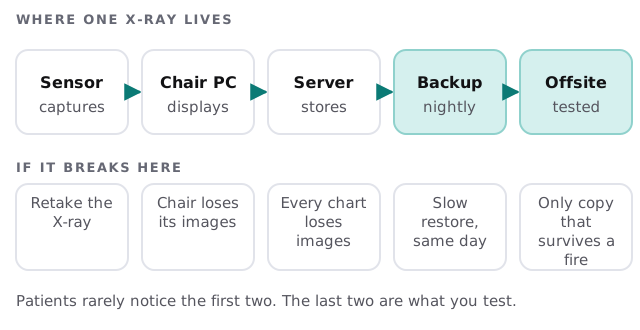
- A backup plan, a disaster recovery plan and an emergency mode plan. All three are listed as required.
- Unique user identification. Every person signs in as themselves.
- Automatic logoff. Listed as addressable, which means you implement it or document why an alternative fits.
- Safe disposal. The rule lists disposal and media re-use as required, which matters the day an old chairside PC or a failed drive leaves the building.
- A record of activity. Systems holding patient information should log who did what.
A Monday in a well-run office
The server installed its updates on Sunday night, not at 9:00. The hygienist’s new sensor works because the driver was tested on one chair before it reached all four. The front desk signs in with personal accounts, so when someone leaves, one change closes their access everywhere. A backup report arrived over the weekend, and once a quarter somebody restores a few images to prove it.
Nothing about that Monday is exciting, and that’s the goal. The same discipline applies to a new hire: their accounts, their chairside login and their phone-system extension are set up before their first patient, not during it.
What we need from you
- A tour. Walk us through every chair, the front desk and the closet where the server lives.
- Your software list. Practice management, imaging, claims and any portals.
- Your vendors. Who supports each sensor and who you call when it fails.
- Your staff list. Who needs access to what, and who has left recently.
Then book the free IT check. We’ll draw your floor map with you, mark what’s solid and what isn’t, and send a plan and a fixed quote for the rest.
The sensor is the visible part of dental IT. The network, the image store and the backup are the parts that decide whether the day runs.