Managed IT services for manufacturers have to respect something an office never has: a machine that is partway through a run. Office computers are patched, restarted and replaced on a schedule. A controller that is cutting a part, or a screen that runs a press, may be tied to one software version for years. Treating them the same is how production stops.
Two sides of the plant
Start by drawing the plant as two sides with one place where they meet.
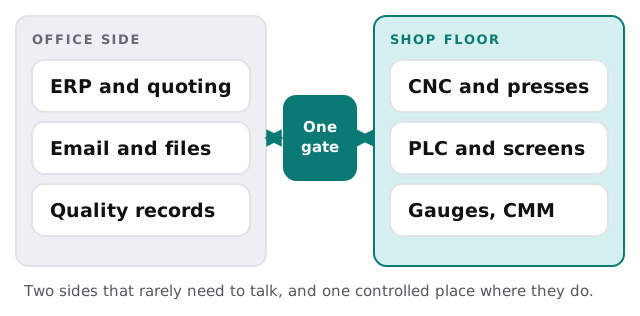
What crosses the gate is usually short: part programs coming down, production counts and inspection results going up, and the occasional remote session from a machine vendor. Anything else needs a reason.
How a part program travels
The riskiest file in a small plant is often a program that someone copied to a USB stick in March and edited in June.
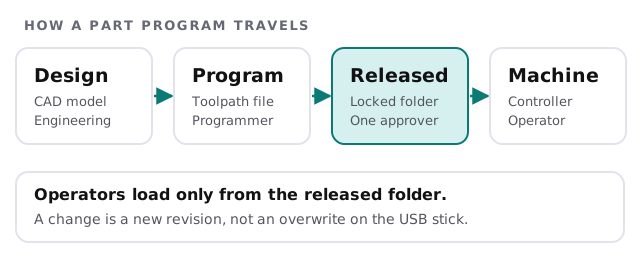
Give the released folder one approver and a revision rule. Operators read from it, programmers write to a working folder, and nobody changes a released file in place. When a customer asks which program made lot 114, you can answer.
Who touches what
| Person | Works with | The IT job |
|---|---|---|
| Planner or buyer | ERP, quotes, supplier email | Sign-ins, backups, protection from fake invoices |
| Programmer | CAD, CAM, program files | Strong machines, version control |
| Operator | Controller, operator screen | No personal accounts or browsing on these |
| Quality | Gauges, inspection software, reports | Records that cannot be quietly edited |
| Maintenance | Machine vendor’s remote tools | Access that opens for a visit, then closes |
Notice who is missing from that table: the person who is also the IT department. In a small plant that is often the maintenance lead, who restarts the server between fixing a conveyor and ordering belts. We take the office-side chores off that person’s list, such as accounts, updates and backups, so their time stays on the machines. We also write down what they already know, such as which cable feeds which cabinet, because that knowledge currently lives in one head.
If you make parts for defense contracts
Some manufacturers carry a contract clause that goes beyond ordinary good practice. DFARS 252.204-7012 requires a contractor to apply the NIST SP 800-171 security requirements to the systems that hold covered defense information, and to report a cyber incident within 72 hours of discovering it. Whether the clause is in your contract, and which systems it covers, is a question for your contracting officer or counsel. What we can do is help you draw the boundary around the systems in question and keep the administration of them tidy.
Questions before anyone touches the floor
- Which machines are tied to a specific software version? Make that list before the first update.
- Who can approve downtime, and how much notice do they need?
- How are controller settings backed up, and has anyone restored one?
- Which vendors have remote access, and when does it end?
- What happens when the ERP is down for an hour? Name the paper fallback.
Planned downtime is the update window
Production schedules already include downtime for changeovers, maintenance and holidays. We plan office-side updates for evenings and weekends, and floor-side changes for the stops you already have on the calendar. Anything that must happen sooner gets a short written plan: what changes, how you will know it worked and how you would undo it.
What we need from you
- A walk of the floor, noting every device with a network cable.
- Your machine list, with vendors and software versions where known.
- Your customers’ security clauses, if any.
- A production calendar showing planned stops.
Monthly care covers access controls, backups and updates. The free IT check ends in a plan and a fixed quote.
The office can restart on Tuesday. The machine can’t restart until the run is done.