Managed IT services for marketing agencies start with a list nobody has written down: every account your people use that belongs to someone else. Ad platforms, analytics, social pages, email tools, domain registrars. The agency’s own computers matter, but the client accounts are where the risk sits.
Who owns what
The cleanest arrangement is simple. The client owns the account. The agency is a named user inside it, with the lowest role that does the job.
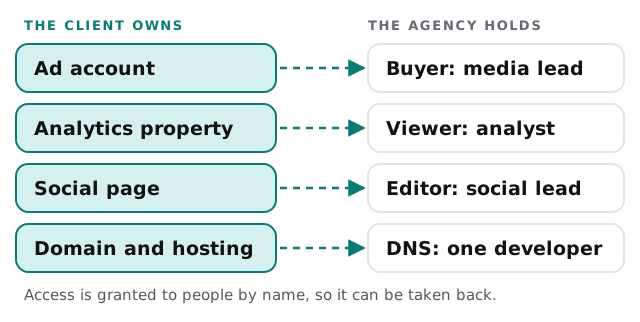
When an agency creates an account under its own email for a client, the account becomes the agency’s problem for as long as the client stays and a dispute if the client leaves. Put ownership in the onboarding checklist and ask the client to add your people.
What an agency actually runs
| Area | Typical tools | Where it goes wrong |
|---|---|---|
| Creative production | Design and video software, large-file storage | Files on laptops, no version history |
| Project and approvals | Boards, review links, proofing | Feedback scattered over email and chat |
| Ads and analytics | Client-owned platforms, reporting dashboards | Shared agency login, unclear roles |
| Social scheduling | A publishing tool linked to client pages | Tokens that expire on the day of a launch |
| Time and billing | Timesheets, invoicing | Hours entered by memory on Friday |
| Credentials | A password manager, ideally | Passwords kept in notes and spreadsheets |
One client, start to hand-off
Each engagement has a beginning, a middle and an end, and your access should follow all three.
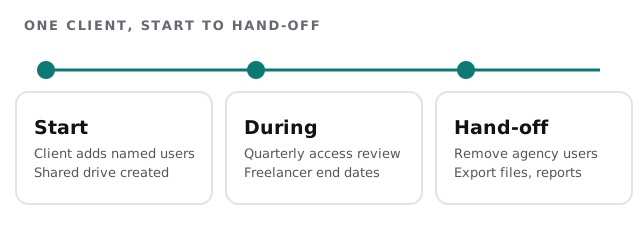
Handing off well is a selling point. A client who sees a tidy list of what you removed and what you exported trusts you with the next project.
Freelancers and the busy week
Most agencies stretch with contractors when a campaign launches. The risk is not that freelancers are careless. It is that their accounts outlive the project and their own laptops sit outside your rules. A short routine fixes most of it:
- Create a project account, not a copy of an employee’s.
- Limit it to the client’s folder and the tools the brief needs.
- Ask for a screen lock and updated software on any device they use for your work.
- Set the end date when you create the account.
- Review the list after launch, and close what is finished.
Large files, short deadlines
Video and design files are large, and review rounds multiply them. Keep a working area that syncs well, an archive that doesn’t, and a rule for moving a campaign from one to the other. Backups should cover both, and someone should have restored a file from them at least once. Ask a simple test question each quarter: if the designer’s laptop vanished tonight, what would be lost by Friday morning? If the honest answer is “the last two weeks of the pitch,” the sync folder isn’t doing its job. Also decide where final approved work lives, separate from drafts, so a client request for last year’s logo files takes two minutes and not a search through someone’s downloads.
The client’s data in your hands
Agencies hold customer lists, ad audiences and sometimes login details for a client’s store. Treat those like the client’s property. Store them in the client’s folder, limit who can open them and delete working copies when the project ends. If a client asks what you hold, you should be able to answer in an afternoon.
What we need from you
- A list of the client accounts your team touches, and who has what role.
- Your freelancers, past and current, and what they were given.
- Where creative files live today, in every place.
- Your tool list, with who pays for and administers each.
Monthly care covers access controls, backups and updates. We begin with the free IT check, which ends in a plan and a fixed quote.
A client trusts you with their accounts. Make sure you can show who has had access and when it ended.