Most Microsoft 365 tenants were set up in an afternoon and never looked at again. Someone was an admin for a project and still is. A mailbox forwards to an address nobody remembers. A guest from a finished job still has access. A Microsoft 365 security review is a structured look at all of that, so the list of problems is written down instead of guessed.
What gets reviewed
We walk six areas. Each one has a handful of questions, and each question has a plain answer in your settings.
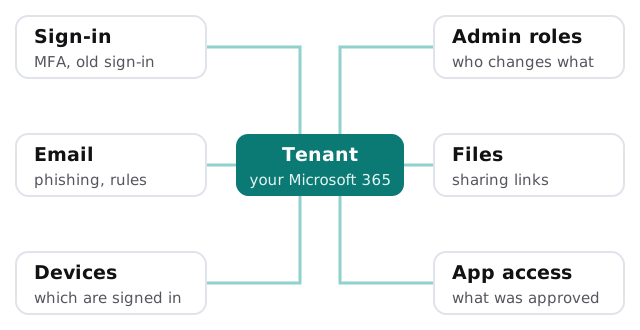
Sign-in
Is multifactor authentication on for everyone, including admins? Is old-style sign-in still allowed? Microsoft’s security defaults cover the basics: they require everyone to register for MFA, require admins to use it, and block legacy authentication, which Microsoft notes can’t do MFA and so lets attackers bypass it. We check whether you’re running them, or Conditional Access instead.
Admin roles
How many people can change everything? Are admins using a separate account from their day-to-day one? Microsoft advises exactly that, because it significantly reduces how often admins are prompted for MFA. We list every admin and ask whether each still needs the role.
Email, files and devices
Forwarding rules, shared links open to anyone, devices that haven’t been seen for months, and third-party apps that were approved once and forgotten. These are rarely dramatic. They’re the usual quiet gaps, and they tend to pile up in any tenant that’s been running for a few years without a clear-out.
How Secure Score fits in
Secure Score is Microsoft’s own measure of your configuration, shown in the Defender portal. Each recommended action is worth 10 points or less, and some give partial credit.
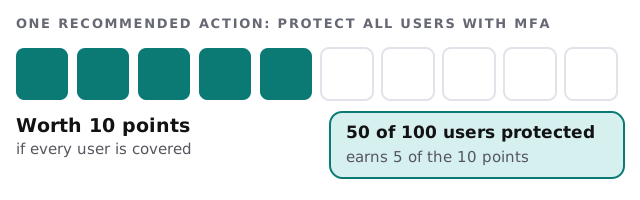
We use the recommendations as a checklist, then add what a number can’t see: whether the admin who left last year is still listed, or whether a shared mailbox has a password nobody changed. Secure Score also shows recommendations for products you may not own a licence for, so we separate what you can act on today from what would need a purchase.
What the report looks like
| Finding | Why it matters | Effort |
|---|---|---|
| MFA not enforced for two accounts | Password-only sign-in on live mailboxes | Small |
| Legacy sign-in still allowed | Bypasses MFA entirely | Small, but test printers and scanners first |
| Eleven global admins | Too many keys to the whole tenant | Medium |
| Anyone-with-the-link sharing | Files reachable without sign-in | Medium |
These rows are examples of the format, not findings from a real client. Yours will list your accounts, in order of what to fix first.
What we ask you for
A short list: read-only access that you grant and can revoke, one person who knows who left and who joined this year, and a list of the printers, scanners and apps that send mail through Microsoft 365, so we don’t recommend blocking something that’s still in use.
Questions to ask any reviewer
- Will you work with read-only access, and how do I remove it afterwards?
- Do you report on my settings, or just paste a score?
- Will I get a fix list I can hand to anyone, not only to you?
- What do you check that Secure Score doesn’t?
After the review
You get a plan and a fixed quote for the fixes, and you decide which ones to hand us. Some are quick changes you could make yourself; for sign-in, our page on multifactor authentication setup covers the rollout, and Microsoft Defender for Business setup covers the device and email protection end. If you need a broader view across more than Microsoft 365, see our cybersecurity assessment.
A security review isn’t a score. It’s a short list of changes, in the order that removes the most risk.