On move-in Monday, twelve people arrive to desks and a pile of boxes. There is no internet yet because the order went in last week. The printer is in a box nobody can find. Someone has plugged the router into a socket that is switched off at the wall. IT setup for a new office is the work that stops that Monday from happening.
It is mostly a question of order, plus a few decisions that are hard to undo once the walls are finished.
The order things happen in
Some tasks wait for others, and some take no waiting at all. The trick is to start the slow ones first.
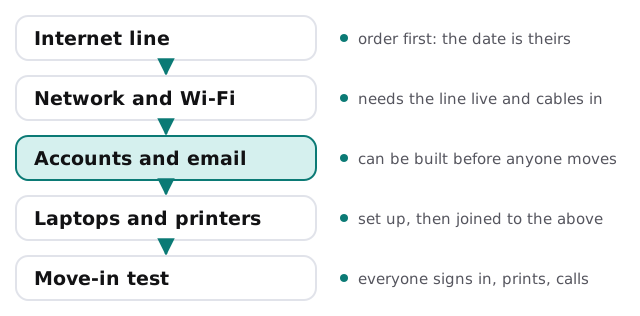
Internet provider installs are scheduled by the provider, not by you. That is why the line comes first. Everything else follows from it.
Where the technology goes
Before you draw the floor plan, mark the places that need a wire or a socket. It is easier to move a desk on paper than to move a cable run later.
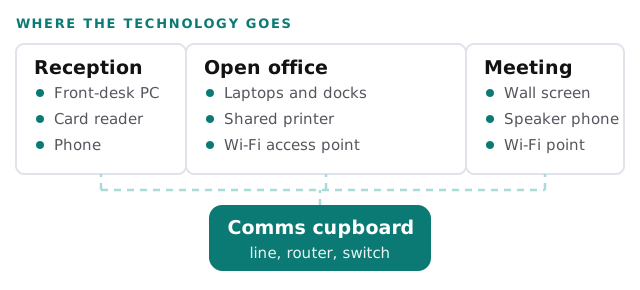
A comms cupboard needs power, ventilation, and a door someone can open. It cannot be the same space where the cleaning supplies live and the floor gets mopped.
Decide before you sign
| Decision | Why it cannot wait | Who decides |
|---|---|---|
| Where the equipment lives | It sets the cable runs and the power | You, with the landlord |
| Which providers reach the building | It limits your choices of line | You, from a list we help gather |
| Wired or Wi-Fi at each desk | Wiring is cheap before the walls close | You, desk by desk |
| How many printers, and where | Placement drives network points | The office manager |
| Phones | Desk handsets, apps or both | The owner |
| Who holds the admin logins | A first-day security question | One named person |
What we build while the walls go up
- Accounts and email. One account per person, shared inboxes as groups, protections turned on from the first day. Choosing between the two big platforms is covered in Microsoft 365 versus Google Workspace. If you are starting fresh, our pages on Microsoft 365 setup and Google Workspace setup show the sequence.
- Shared files. A folder structure that matches how you work, agreed before anyone starts saving.
- Domain and mail records. Held by you, checked early. See domain and DNS management.
- Laptops. Set up in advance so people sign in and see their own work. Moving existing machines is covered in computer migration to new laptops.
- Wi-Fi. Planned for where people sit, with a separate guest network. More in business Wi-Fi security.
Questions to ask the landlord and the provider
- Is there existing cabling, and what condition is it in?
- Which internet providers serve this exact address?
- Can we put a cupboard here, and who holds the key?
- Is there a power supply that stays on over weekends?
- What happens to the line if we move out early?
The move-in test
Do this on the Friday before. Ask a few real people to sign in, print, make a call and open the shared folder. Do it at a normal desk, not at the technician’s bench. Whatever fails is a fixable surprise on Friday and an expensive one on Monday.
A new office’s IT should be boring on day one. The excitement belongs to the move, not the Wi-Fi.
What we need from you
- The floor plan, even a sketch, and the move date.
- A list of people and the devices they use now.
- Whatever the lease says about cabling and who may alter it.