Both suites do email, documents, spreadsheets, file storage and meetings. Both are secure when they’re set up properly. So the Microsoft 365 vs Google Workspace for small business decision is rarely about features on a comparison chart. It’s about friction: which one fits the way your team and your clients already work.
Side by side
| The job | Microsoft 365 | Google Workspace |
|---|---|---|
| Outlook | Gmail | |
| Documents | Word, as a full desktop app and on the web | Docs, browser first |
| Spreadsheets | Excel | Sheets |
| Files | OneDrive for each person, SharePoint for teams | Drive, with shared drives for teams |
| Meetings and chat | Teams | Meet and Chat |
| Device management | In some plans | In some plans |
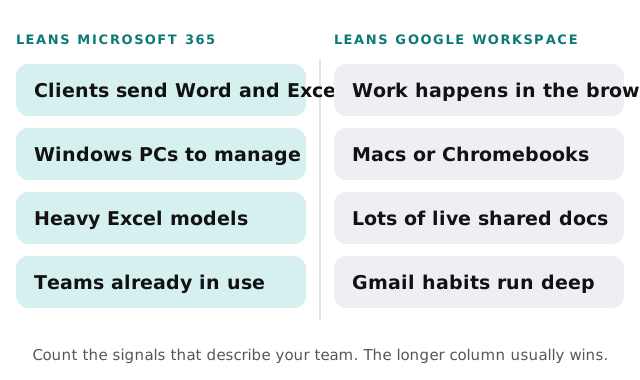
Where each one tends to win
Microsoft 365
- Clients and partners send Word and Excel files, often with tracked changes.
- Someone runs serious Excel models with macros or large data.
- The office runs on Windows PCs that need to be managed centrally.
- Your industry software plugs into Outlook or Teams.
Google Workspace
- Most work happens in a browser, on Macs or Chromebooks.
- Documents are written together, live, by several people at once.
- The team already thinks in Gmail labels and Drive links.
- You want as little to install as possible.
The difference you feel every day
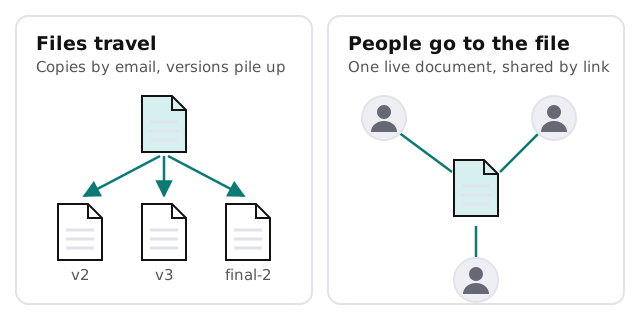
The deepest difference isn’t an app. It’s the habit each suite builds. Microsoft grew up around files you open, edit and send. Google grew up around one live document that people visit. Both now do both, but the habit shows.
Things that matter less than people expect
- Price. At small-business sizes the plans land close enough that friction costs more than the difference.
- Storage. Both give each person plenty for ordinary office work.
- Security. Either one is safe with multi-factor sign-in, sensible sharing settings and limited admin accounts, and neither is safe without them.
Switching later
You aren’t locked in. Mail, calendars and contacts move across with the vendors’ own migration tools, and files follow with some cleanup. If you’re already on Google and leaning the other way, our page on Google Workspace to Microsoft 365 migration walks through the order that keeps email flowing.
Check these before you decide
- List the file types your clients and partners send you in a typical month.
- Count the computers by type: Windows, Mac, Chromebook.
- Note which business software has to connect to email or calendars, and which suite it supports best.
- Find out who truly needs desktop Word or Excel rather than a browser version.
- List shared addresses like info@ and billing@ and who answers them.
If two of those answers point different ways, weigh the client files most heavily. Devices can be replaced over time; the formats your clients send are set by them.
Running both at once
Some businesses end up with Gmail for email and Microsoft for documents, or the reverse, usually by accident. It works, but you pay for two sets of accounts, two places to manage security, and a constant question of where a file lives. Pick one as home base and use the other only where a client insists.
Security settings that matter on either
Whichever you choose, the same handful of settings do most of the protecting: multi-factor sign-in for everyone, admin rights limited to two or three accounts, external sharing set deliberately rather than left at the default, alerts for unusual sign-ins, and a plan for removing access the day someone leaves. Neither suite is safe without them, and both are solid with them.
Choose the suite that matches the files your clients send. Fighting your clients’ formats every day costs more than any subscription difference.