Most owners ask about managed IT vs in house IT as a cost question, and get stuck. The better comparison is coverage. Outsourced IT vs internal IT looks very different once you ask what happens on a sick day, during a holiday, or in the week someone gives notice.
Coverage is the real comparison
An in house employee is one person. They can be excellent, and they still get ill, take leave and move on. A managed arrangement is a team that shares what it knows about your setup, so one person’s absence doesn’t leave a gap.
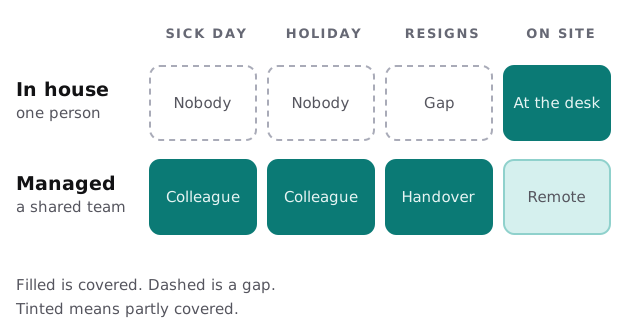
What each model does well
In house
- Notices small problems early because they see people every day.
- Handles hands-on jobs: unpacking a laptop, moving a printer, running a cable.
- Understands the business, so priorities need less explaining.
- Is there for the daily interruptions that don’t justify a ticket.
Managed
- Keeps working when one person is away, because several people know your setup.
- Brings a wider range of skills than one hire can hold, from email security to backups.
- Runs monitoring, updates and backup checks on a schedule rather than when time allows.
- Keeps records the business owns, so knowledge doesn’t walk out of the door.
What stays with you either way
Neither model removes your responsibility for the decisions only you can make. Choosing what matters most, approving spending, and knowing which staff need which access can’t be outsourced.
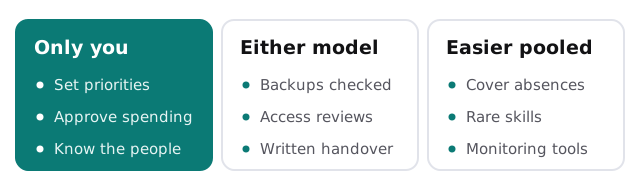
Both models also depend on the same unglamorous basics. Someone has to check that backups restore, remove leavers’ access, and keep the device list honest. If you are weighing a hire against a provider, ask who does these jobs, not just who answers the phone. Our page on hiring an IT person vs outsourcing goes deeper on the staffing side, and managed IT vs break fix covers the billing question we’ve skipped here.
Co-managed: a third arrangement
Some businesses keep one person on staff and add a provider behind them. The employee stays the face of IT. The provider handles the work that benefits from a team: monitoring, patching, backup checks, security settings and cover for absences. It suits a business that has outgrown one helper but can’t justify a department.
Signs your single hire is carrying too much
- Their holidays are the part of the year you quietly worry about.
- Nobody else knows where the router, the backups or the domain are managed.
- They spend most days on fixes and never reach the improvements they planned.
- Requests arrive by shoulder tap, so nothing is recorded and nobody can see patterns.
- They’ve asked for training or a second pair of hands more than once.
None of these means the hire was a mistake. They mean the job has outgrown one chair, and that’s the point where a team behind the person starts to pay off.
Three questions that settle it
- Could we run for two weeks if our IT person disappeared tomorrow? If the honest answer is no, you have a coverage problem, whichever model you pick.
- How much of our IT work needs someone physically present? If it’s a lot, an on-site person matters. If most of it is accounts, software and security, remote work covers it.
- Who owns the knowledge? Whatever you choose, insist the admin logins and documentation belong to the business and are written down somewhere other than one inbox.
If you’re not sure where you stand, the free IT check looks at exactly these points, and you get a plan and a fixed quote afterward. A real person replies within one business hour, Monday to Friday, 9am to 5pm Pacific.
You aren’t choosing between a person and a company. You’re choosing how much of your IT depends on someone being in the building.