Most small-business IT projects don’t fail on the technology. They fail on the gaps between people: the internet provider’s install date slips, the new laptops arrive before the accounts exist, nobody told the phone company about the move. IT project management services close those gaps by giving the whole thing one owner.
Signs you need one
- Three or more companies are involved, and each has its own timeline.
- A fixed date matters, such as an office move, a lease end or a software end-of-support deadline.
- Staff will notice if it goes wrong, because it touches email, files or the phones.
- You’ve been the person chasing everyone, and it’s turning into your second job.
- Something similar went badly last time.
Who does what
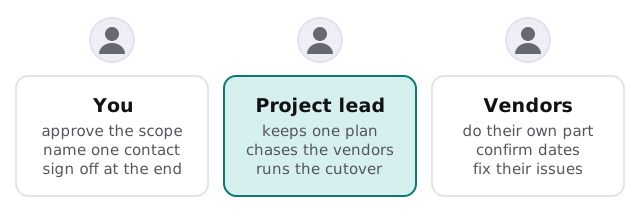
The aim is for each party to do their own part and nothing more. You decide and approve. The vendors deliver. The project lead holds the plan and keeps everything moving between them.
A project in four phases
| Phase | What happens | Your part |
|---|---|---|
| Scope | We write down what’s in, what’s out and what “done” means | Approve it |
| Plan | Steps, owners and dependencies go into one document, with a fixed quote | Confirm dates that matter to you |
| Deliver | Vendors and we do the work, with a running status | Answer questions quickly |
| Cutover and handover | A rehearsed switch, then a short note on what changed | Sign off |
What the status looks like
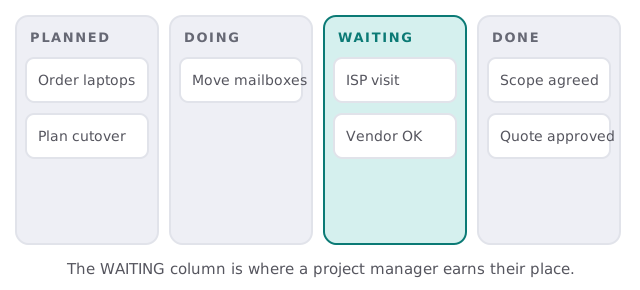
You shouldn’t need to ask how it’s going. We keep a simple board where every task sits in one of four places, and the one that matters most is “waiting”.
The plan we write
- Scope in a page. What’s being done, what isn’t, and what “finished” looks like in terms you’d recognise.
- The dependency list. Which steps must happen first, and who has to deliver them.
- The cutover plan. The exact order of the switch, who’s present, and the way back if something fails.
- The risk list. The three or four things most likely to slip, and what we’ll do if they do.
- The handover note. What changed, what to check next week, and who to call.
Here’s what cutover day looks like with a plan behind it. The project lead has the order of steps on one page. Each vendor knows when they’re needed. Your staff were told yesterday what will change and what to do if something looks wrong. When a step takes longer than planned, the next one waits, and nobody improvises. If a check fails, the plan says whether to fix forward or go back, because that decision was made calmly last week rather than under pressure at the time.
Projects this suits
Office moves, a new office set-up, server replacement, a move from an on-premises server to the cloud, and migrations of mail or files. If you’re planning a relocation, see our page on office move IT services, and for a fresh space, IT setup for a new office. Replacing hardware? Replacing an old server and moving computers to new laptops cover the technical side. For the Microsoft side of a merger, we also write about Microsoft 365 tenant to tenant migration.
Questions to ask any project manager
- Who’s the one person I’ll hear from?
- What happens if a vendor misses a date?
- Will I see the plan and the dependency list before we start?
- How is the cutover rehearsed?
- What do I get when it’s over?
A project plan isn’t a Gantt chart. It’s a list of who has promised what to whom, and by when.