A merger or a split leaves you with two Microsoft 365 tenants and one group of people who need to work in a single one. Microsoft 365 tenant to tenant migration is how you move them. It isn’t a button. It’s a sequence of preparation, coexistence and batched moves, and a few things on the way that Microsoft says plainly do not come across.
What crosses and what doesn’t
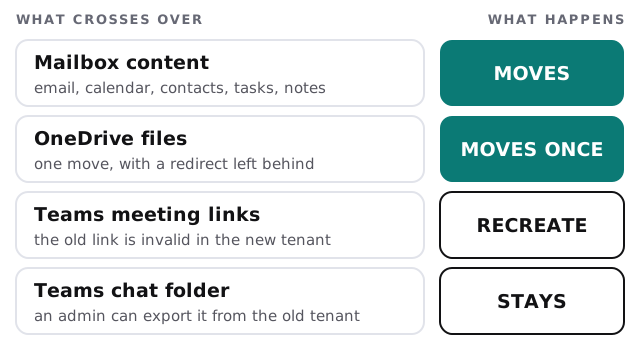
Microsoft’s documentation is specific here, so we plan around it rather than around hopes. When a mailbox moves between tenants, only user-visible content comes with it: email, contacts, calendar, tasks and notes. The source mailbox is deleted afterwards, so it can’t be found in the old tenant again.
Settle these before anything moves
- The licence. Cross-tenant migration needs a per-user licence from Microsoft, a one-time fee per migrated user, on either the source or target account. It covers OneDrive too. Without it the move fails, so we confirm it first.
- The target accounts. Each person needs to exist in the new tenant before their mailbox can arrive. Microsoft says the system fails to move users who aren’t set up correctly there.
- Holds. Mailboxes and OneDrive accounts under a hold policy are blocked. Someone has to decide whether to lift the hold, migrate, then reapply it.
- Shared mailboxes and delegates. Microsoft says cross-tenant mailbox and calendar permissions aren’t supported, so people who share access must move in the same batch.
- Existing OneDrive sites. In the new tenant, a OneDrive site must not already exist for the person, or the move fails.
The order of the move
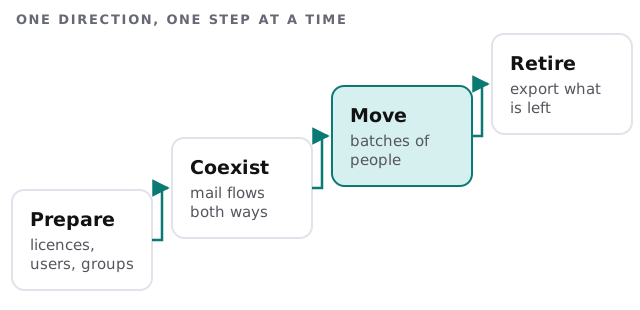
During coexistence, each migrated mailbox leaves a routing record behind in the old tenant, so mail sent to the old address still reaches the new one. That’s why people can move in groups instead of all in a single night.
Where these projects go wrong
Treating OneDrive like email
Mailboxes can be planned in batches with a safety net. OneDrive is one move, with no second pass for stragglers. Microsoft also sets a 400-character limit on the full file path, so deep folder trees in the old tenant can fail against a long new URL. We check path lengths beforehand and shorten what needs it.
Forgetting the Teams meeting links
Calendar items come across, but the Teams link inside them points at the old tenant and stops working. Anyone who organises recurring meetings needs to recreate them. A short note to staff before the move saves a morning of “the link doesn’t work”, and a reminder afterwards catches the people who missed it.
Skipping the domain plan
People will want the new tenant to send as the old company’s address. That’s a domain change, and it needs planning so mail keeps flowing while people move. We plan it alongside the move; see our page on domain and DNS management.
Government clouds
Microsoft states that cross-tenant OneDrive migration isn’t supported for GCC, GCC High or DoD tenants. If you’re in one of those, tell us at the start, because the whole approach changes.
Questions to ask any provider
- Which licence is assigned, and to whom, before the first batch?
- What’s the plan for holds, shared mailboxes and Teams?
- How will staff be told what changes, and when?
- Who checks the move afterwards, and against what list?
For the mailbox side by itself, our email migration service page explains the broader approach. If the files live in SharePoint rather than OneDrive, see SharePoint migration.
Moving the mailboxes is the easy half. The Teams links, the paths and the holds are where tenant merges go wrong.