Pipedrive is a pipeline-first tool, and teams that outgrow it usually want marketing, service or reporting in the same place as sales. That is when a Pipedrive to HubSpot migration comes up. It is one of the more forgiving moves, because the objects line up closely. The work is in the parts that don’t.
The names line up
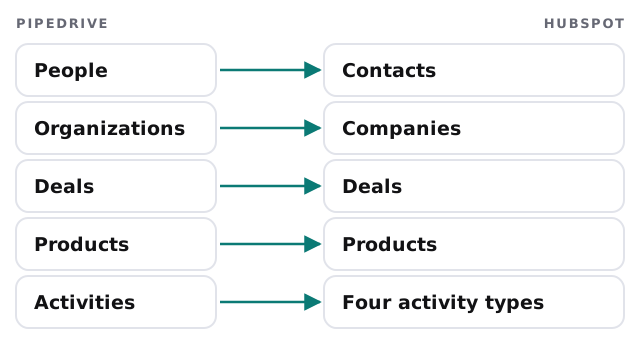
HubSpot’s Smart Transfer is its official one-way, one-time tool for this. Its supported-apps page lists people, deals, organizations, email activities, meetings, notes, products, calls, tasks, currencies and users for Pipedrive, with custom activities mapped to calls, emails, meetings or tasks. Only a Super Admin can run it, and HubSpot suggests an audit of the source first: record counts, pipelines, stages and field types.
Three things to settle
1. Activities and the Data Hub question
HubSpot says a Data Hub subscription is required to sync Pipedrive activities. That is a cost decision that belongs in the plan before the project starts, not a surprise in the middle. If you decide against it, the options are to carry only notes and deals, or to export activity history and keep it as an archive.
2. What doesn’t sync
HubSpot lists four things as a one-time transfer after the main sync, which then won’t stay up to date: attachments, deal participants as contact associations, products on deals as line items, and organization relationships as labeled associations. Logged emails aren’t synced at all.
3. Dates on deals
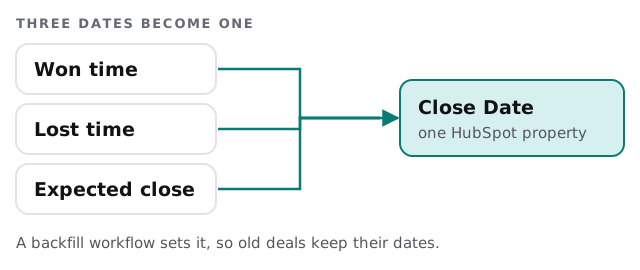
Won and lost dates matter for reports. HubSpot describes a backfill workflow that sets Close Date from the won time, lost time and expected close date, and another that sets Create Date from the creation time.
What you rebuild
- Pipelines and stages. Review each against how deals move today, and rename where needed.
- Automations. Automations are logic, not data, so each is described and rebuilt as a HubSpot workflow, or retired.
- Web forms and email tools. Repointed to HubSpot.
- Reports. Rebuilt from the questions your team asks.
- Users and permissions. Set up fresh, with a Super Admin.
The order we move things in
| Step | What happens | Check |
|---|---|---|
| Audit | Counts, pipelines, custom fields | Numbers written down |
| Clean | Duplicates merged in Pipedrive | Same person, one record |
| Transfer | Smart Transfer, objects first | Totals match |
| Second pass | Attachments, participants, deal products | Records show the right links |
| Switch | Forms and apps repointed | A test lead lands in HubSpot |
Signs a move is worth it
- Marketing emails live in one tool and deals in another, and nobody trusts the join.
- Support questions reach sales by forwarded email.
- You keep a spreadsheet beside the pipeline because reports can’t answer the owner’s questions.
- A second team wants to use the same customer list.
If none of those sounds familiar, staying put and tidying Pipedrive may be the cheaper answer, and we will say so.
If you are not sure HubSpot is the target
HubSpot isn’t the only place to go. If what you want is a lighter tool built around your own process, a custom CRM for small business is worth a look. If you are simply moving a spreadsheet or file, moving Excel data into a CRM covers it.
What we need from you
- Admin access to Pipedrive and a Super Admin login for HubSpot.
- A decision on whether to buy the Data Hub subscription for activities.
- Someone who can tell us which custom fields people actually use.
If you would like to see what the destination looks like first, our guides to setting up Pipedrive and setting up HubSpot cover both ends.
The data is the quick part. Decide early what you will do about activity history, because that is where the cost and the arguments hide.