Key takeaways
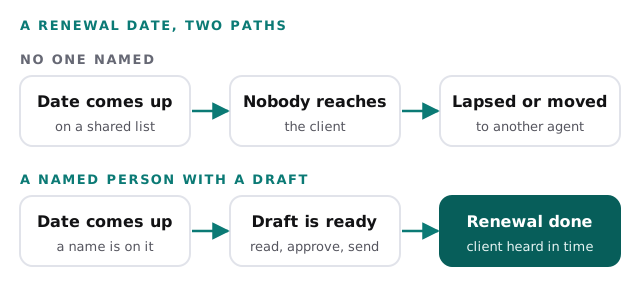
- A missed renewal is a policy that renews late, lapses or moves to another agent because nobody reached the client in time.
- Count three things: renewals that slipped last year, what each one earned your agency, and the hours spent tracking dates by hand.
- Notice rules set hard clocks. Texas and Wisconsin each require at least 60 days' notice of a nonrenewal in the cases cited here, and your state may differ.
- Look for a setup that lists every renewal by date, drafts the outreach and lets a person approve it before it goes out.
Missed insurance renewals are hard to see, because nothing dramatic happens on the day one is missed. A policy renews a few days late. Or it lapses. Or the client quietly signs with another agent who called first. The cost shows up months later, as a name that is no longer on your book.
This post helps you count them. It also counts the hours your team spends tracking renewal dates by hand. Then you can decide whether that is worth fixing.
Four ways a renewal slips
A missed renewal is not one thing. It is four, and they cost different amounts.
| What happened | What it costs you |
|---|---|
| The renewal went out late | A scramble, and a client who noticed |
| The policy lapsed | A gap in coverage and an awkward call |
| The client moved to another agent | The policy and what it would have earned |
| A nonrenewal was not remarketed in time | A client left to find coverage alone |
The first one costs time. The other three cost a client. Your worksheet below keeps them separate, because you may find you have plenty of the first and almost none of the second.
The clock your state sets
Some of these dates are not yours to choose. The Texas Department of Insurance says that when a company does not renew an auto policy, it must give at least 60 days’ notice, and it tells drivers to have a new policy in place before the current one expires (Texas Department of Insurance). On its home insurance page, the same department gives 60 days for a policy bought or renewed in 2024 and 30 days for one bought or renewed in 2023 or earlier (Texas Department of Insurance).
Wisconsin’s insurance commissioner says an insurer must mail or deliver a nonrenewal notice at least 60 days before the policy’s expiration date, and the notice must state the reason. If the insurer misses that window, it must continue the coverage on the prior policy’s terms and premium, for up to a year (Wisconsin OCI).
Those are two states, and the rules differ by state, by line and by when the policy was written. Check your own state insurance department, and treat this post as a prompt to look, not as legal advice. The point for your agency is simpler. A notice starts a window. Someone has to see it, call the client and get quotes inside that window. If the notice sits in a shared inbox for two weeks, you have less window than the rule gave you.
Count what slipped last year
Do this in one sitting, with your producers and service staff in the room.
- Pull last year’s list of expiration dates.
- Go down it and mark every policy that renewed late, lapsed or left.
- For each mark, write one line on why. Was the date missed, was the client not reached, or did the client choose to leave?
- Count the marks, then fill in the worksheet.
The numbers in the Example column are made up, to show the format. Put yours in the last column.
| Line | Example | Yours |
|---|---|---|
| Policies that came up for renewal | 1,200 | |
| Renewals that went late, lapsed or moved | 18 | |
| What one of those earned your agency in a year | $400 | |
| Lost or late renewals for the year (18 × $400) | $7,200 | |
| People who track renewal dates by hand | 3 | |
| Hours a week each spends on it | 2 | |
| Cost of a staff hour (from your payroll) | $30 | |
| Tracking time for the year (3 × 2 × $30 × 50) | $9,000 | |
| Total for the year | $16,200 |
The “what one earned” line should come from your own books. Use a year of commission, not a lifetime, so you are not guessing at how long the client would have stayed. If you want the lifetime view, you can add it yourself, but start with the number you can prove.
The hours behind the dates
The second half of the worksheet is easy to wave away, because tracking dates feels like part of the job. It is part of the job. It is also a cost, and it is the one you can shrink without changing how your clients are treated.
Ask three questions. Where does the master list of renewals live? Who updates it when a policy is rewritten? And who looks at it when the person who normally does is out for a week? If the answer to the last one is “nobody”, that is where your lapses come from. Look at the reasons you wrote down in step three above. If several of them say the client was never reached, the dates were visible and the follow-up still did not happen. That points at the reaching-out, not at the list.
Why the usual fixes fall short
Three fixes are worth looking at, because each one helps and each one stops short.
A date list in your management system. A list that shows what renews in the next 60 days is useful. But a list tells you a renewal is due. It does not reach the client. Someone still has to write, call and log the result, and a long list gets worked from the top, so the renewals furthest out are the ones nobody has started.
A mass reminder email. Sending everyone the same message saves time. But it treats a clean renewal and a nonrenewal as the same event. A client whose premium rose, or who just got a notice, needs a person to call. A blast also gives you no way to know who still needs a nudge.
A shared spreadsheet or calendar. It is cheap, and it works while one person keeps it current. It is also a copy of dates that live somewhere else, so it drifts. The day a policy is rewritten, either someone updates two places or the spreadsheet is wrong.
None of these is a bad tool. Each one moves the problem. The date is now visible, but the reaching-out is still manual.
What to look for instead
For renewals, the answer is a small one. Something watches the dates and prepares the outreach, and a person has the client conversation.
| Ask for | Instead of |
|---|---|
| One list of every renewal, sorted by date | Several lists kept by different people |
| A named owner and a backup on each renewal | A list everyone can see and nobody owns |
| A drafted message for each client, ready to read | A blank screen and a deadline |
| A person approves each message before it goes out | A blast sent with nobody checking |
| Nonrenewals and big premium changes flagged for a call | Every renewal treated alike |
| A way to see what was sent and what is still open | Guessing from the inbox |
We describe the setup on our insurance renewal reminder automation page. Our insurance agencies page shows where else the same approach fits.
Give any change a quarter, then rerun the worksheet the same way. Compare this year’s late, lapsed and moved renewals with last year’s. The gap is what the change earned.
An assistant we built, from the inside
We built an AI executive assistant and operations dashboard. It drafts inbox replies for one-tap approval and answers questions about sales, orders and cash. The demo runs on sample data.
It isn’t a renewal tracker. We’re showing it because the part that matters for renewals is the same part: a draft is prepared, a person looks at it, and one tap sends it. Nobody has to start from a blank page, and nothing goes out unread.
Up close, you can see where the draft comes from and where a person stays in charge.
Behind the scenes
Want a behind-the-scenes walkthrough of a real build?
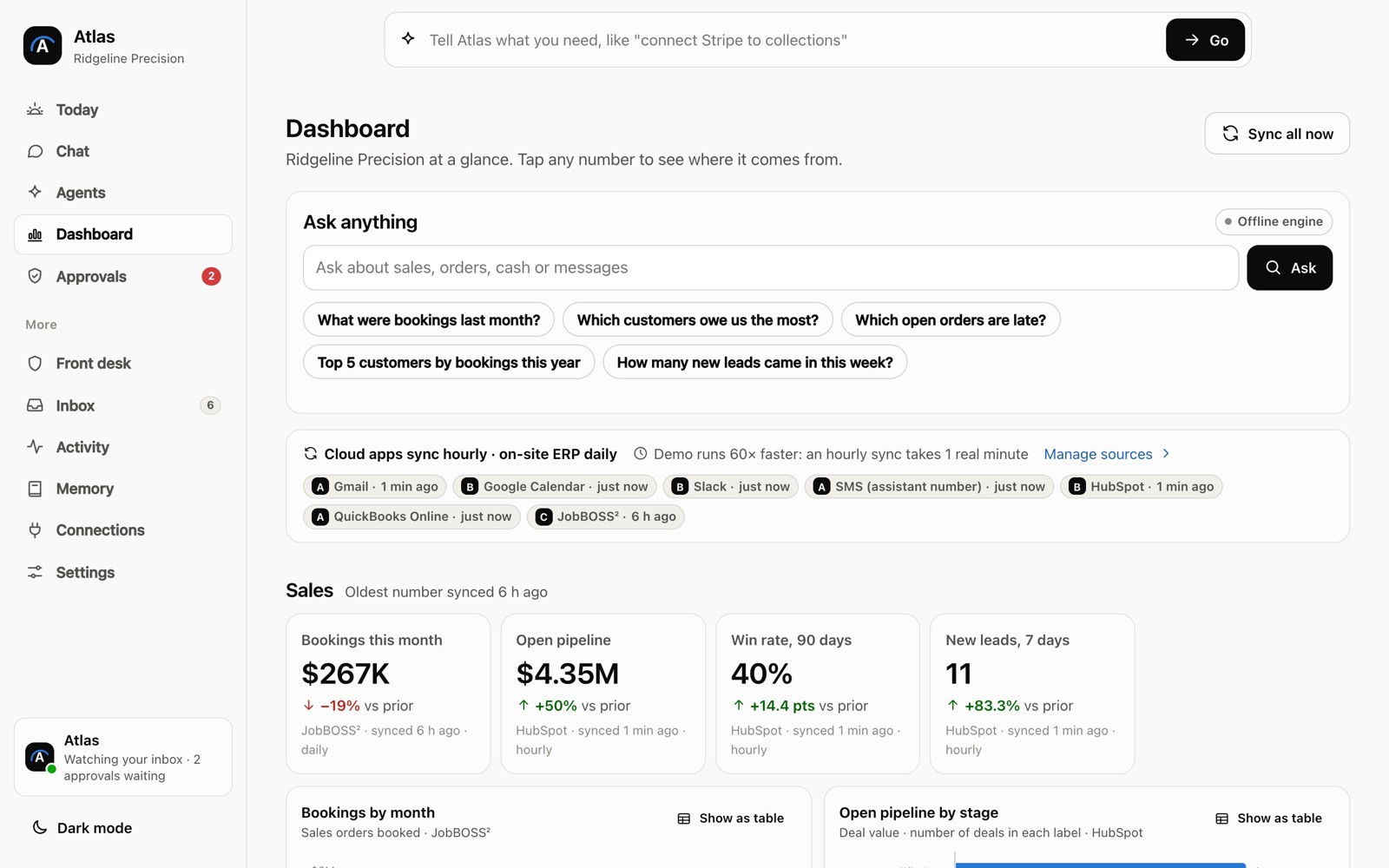
We will take you through it screen by screen: what each person sees, how a record moves through it, and why we built it that way. Then we can talk about the task that costs you most.
Frequently asked questions
How do I find out how many renewals slipped last year?
Pull last year's list of expiration dates and mark each policy that renewed late, lapsed or moved to another agent. Ask each producer and service rep to check the list against what they remember. A policy that is no longer on your book is the easiest one to miss, so look for names that stopped appearing.
Who should own renewal dates in a small agency?
One named person per client, with a second person who checks the list when the first is out. Dates owned by everyone are watched by nobody. Write the names down next to the dates.
What should the reminder to the client say?
Say which policy renews, on what date, and what you need from the client, such as a changed address or a new vehicle. A person on your team should read the message before it goes out, because a renewal with a premium change or a nonrenewal notice needs a personal call.
Sources
About the author
Andy Kang, AI Partner Team. Andy Kang writes the blog for AI Partner Team, which builds AI tools and internal apps for small businesses alongside managed IT and IT projects. The blog shows the math and the reasoning behind that work, so you can check it against your own business.
- Every fact links to the page it came from, listed under Sources.
- Example numbers are labelled as examples, and you can swap in your own.
- Builds are shown on sample data, with no client names or client figures.