Monday, 9:15. Your team opens ClickUp to find out what they are doing this week. One person sees a sidebar full of lists. Another sees tasks in a status called “Ready for maybe”. A third gives up and asks in chat. That scene is why people search for a ClickUp consultant, and it’s almost never a bug. It’s a setup that grew without anyone deciding what it was for.
If you are searching for a ClickUp expert or help with ClickUp setup, this is the work.
What changes when it’s set up well
Same tool, same people, and now it’s quick to see what’s due and who has it. That needs three things: a structure people can find their way around, statuses that mean something, and views that answer a question each.
Five decisions before anything gets built
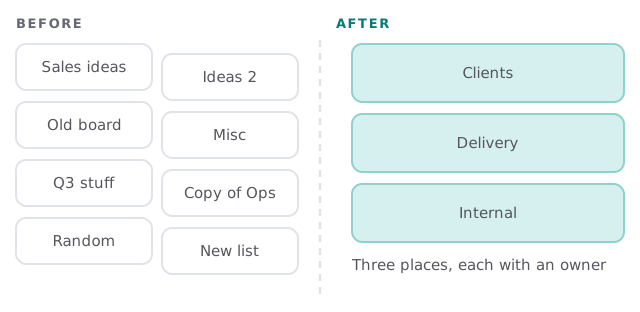
- What are the three places work lives? For many small businesses it’s client work, delivery and internal. Name them in your words.
- Who owns each place? One person per place, who says when a list gets added or merged.
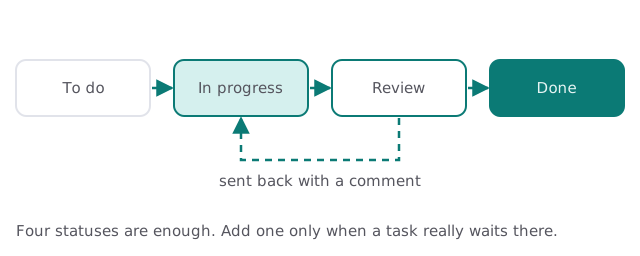
- What does each status mean? Write one sentence per status. If two statuses mean the same thing, merge them.
- What does each person need to see? Their tasks this week, the team’s overdue tasks, what’s waiting on a client. Each becomes a view.
- What gets automated? Only repeated clicks that nobody will miss.
Statuses that mean something
A status is a promise about where a task is. If “In progress” sometimes means “someone is working on it” and sometimes means “someone said they would”, the board lies. We write each status down in one sentence and trim the list until every one is honest.
Too much versus just enough
| Where it goes wrong | What we aim for |
|---|---|
| A dozen statuses, half unused | Four or so, each with a one-line meaning |
| Fields on every task, mostly empty | Only fields someone filters or reports on |
| A list for every idea | A few lists, with owners |
| Automations nobody can explain | A short list, each with a purpose |
| Everyone sees everything | Views built around each person’s question |
A week with it set up properly
On Monday the lead opens one view and sees what’s overdue. Each person opens their own view and sees only their tasks for the week. When work is done they change one status and move on. When something comes back from a client, it goes to review and then back to in progress, with the comment attached. Nobody creates a new list for a new idea, because there’s an obvious place for it already. That quiet is what you’re paying for, and it’s mostly the result of saying no to extra structure.
What we need from you
- Access to your ClickUp workspace, with admin rights for the review.
- Fifteen minutes with two people who use it every day.
- A list of the recurring work your team does.
- Someone who’ll own the setup after we leave.
When ClickUp isn’t the answer
Sometimes the honest finding is that a task tool is being asked to do something else: track customers, run quotes or hold documents. A task tool bends, but it doesn’t turn into a CRM. We’ll tell you when a different tool, or a small custom internal tool, fits better than another list.
Our first step is the free IT check, then a plan and a fixed quote. A real person replies within 1 business hour, Monday to Friday, 9am to 5pm Pacific.
If people need a tour to find their tasks, the setup isn’t finished. Cut it down until nobody needs one.