A phone system is one of the few IT projects where a mistake is heard by your customers straight away. A greeting that loops, a ring group that rings nobody, a voicemail nobody checks: each costs you a call you will never know you missed. Google Voice for business setup is mostly planning, which is why we draw the call flow before opening the admin settings. If you searched for a Google Voice business phone setup, this is what the project covers.
Draw the call first
Start on paper with one question: what should happen when someone dials the main number? Google’s product page describes managing call routing with auto attendants and ring groups, listed under its Standard plan. An auto attendant answers with a menu, and a ring group rings several people at once.
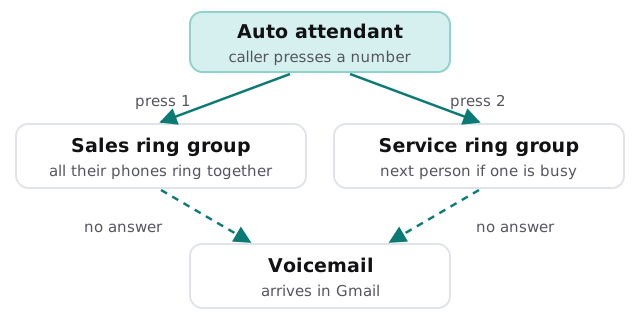
Questions we ask before touching a setting
Who answers, and who covers?
List the people and the hours. Decide who is rung first, who is next, and what a caller hears when nobody picks up. Include lunch breaks, school runs, holidays and the one day a week someone works from home.
Where does voicemail go?
Google says users can receive voicemails and text messages directly in Gmail. That helps if people live in their inbox, and it hurts if the voicemail lands only in a personal mailbox. We choose one place and one owner.
Which phones will people use?
Some staff will use the app on their own phones, some will want a desk handset. The product page notes desk phone support in its listed plans, so we confirm the handset you want works before you buy it.
What happens to the number you have now?
This is the question that decides the schedule, so we answer it first.
Moving the number you already have
Customers know your number. Changing it is a cost you do not want. Number porting moves it across, and Google’s page lists number assignment and porting among the things admins manage. The order matters more than the speed.
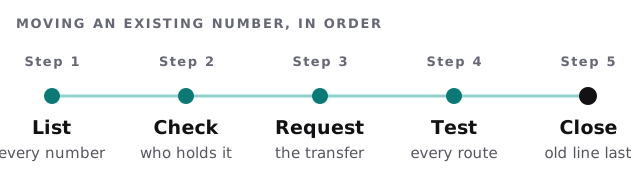
| Check | Why |
|---|---|
| Who is named on the current account | The transfer request usually has to come from them |
| Fax lines, alarm lines, extension numbers | They get forgotten, and break quietly |
| Numbers printed on vans, signs and cards | These are the ones customers actually dial |
| Test calls from a mobile and a landline | Routing can differ by caller |
What usually goes wrong
- No plan for after hours. The greeting says “press 1” but nobody is there to take it.
- Everyone rings at once. Ring groups work for small teams and annoy large ones.
- Voicemail ignored. It lands somewhere, and then sits there.
- Number closed too early. The old line is cancelled before the test calls are done.
- No one owns the admin settings. A change goes in and no one can say who made it.
What we leave to you
The wording of your greeting, and the decision about who must be reachable when, are business choices. We set them up and test them; we do not decide them for you. We also write a one-page note for your staff covering how to forward their calls, how to change a greeting for a holiday and who to tell when something sounds wrong.
What we need from you
- A list of every phone number you use, with its provider.
- Your opening hours and who should cover them.
- The person who can approve changes to the number and the account.
This is a one-off project with a plan and a fixed quote. A person checks every route with a real test call before the system takes live traffic.
A phone system is judged on the call it fails to ring. Test the unhappy paths first.