Most people who need a Freshdesk consultant have the same story. Support started in one person’s email. It moved to a shared inbox, then to a helpdesk because things were slipping through. Now Freshdesk is switched on but not shaped, so tickets still land in one pile. Here’s what shaping it involves, and the questions that matter.
Four decisions, in this order
1. Where do tickets come from?
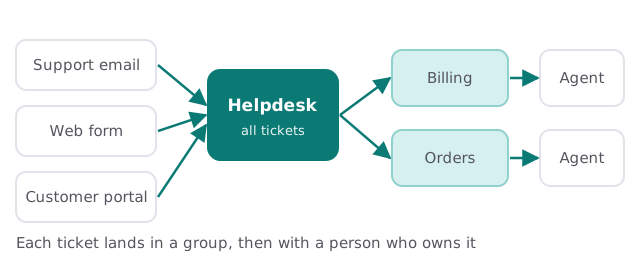
Support email, a web form, a customer portal, perhaps chat. Each source should feed the same helpdesk, so nobody checks two places. Our help desk for small business page covers the wider case for that.
2. Who handles what?
This is the decision people skip. Groups split tickets by topic or team: billing, orders, onboarding. A ticket that lands in a group has a short list of people who can pick it up. Without groups, everybody sees everything and nobody feels responsible. Pick groups that match the questions customers ask, and keep the number small enough that every group always has someone available.
3. How much can each person see?
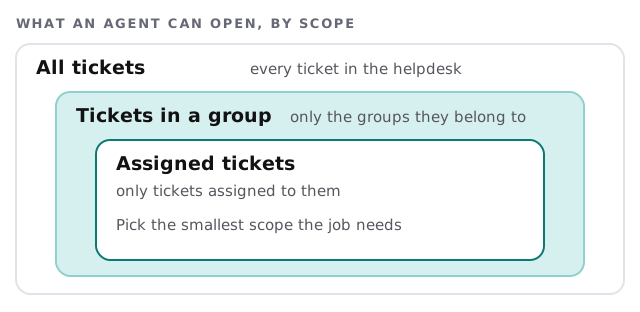
Freshdesk’s help center gives each agent one of three scopes. The narrower the scope, the less noise, and the less chance someone opens a ticket that isn’t theirs.
| Scope | Fits |
|---|---|
| All tickets | The owner, a support lead |
| Tickets in a group | A team member who covers one topic |
| Assigned tickets | A part-timer or someone borrowed from another team |
4. Full time or occasional?
When you add an agent, you choose Full time or Occasional, and the choice goes with the license you assign. People who handle a ticket now and then are a different case from someone who lives in the queue. We look at who really works tickets before anyone is added.
What a tidy first week looks like
- Change the default support email. Replace the starter address with one on your own domain.
- Add the agents. One at a time, with a type, a role, a scope and a group each.
- Create the groups. Match them to how your customers ask, not your org chart.
- Send ten test tickets. Through every source, to see where each one lands.
- Write the rules. Who answers first, who escalates, what “closed” means.
Signs the setup needs attention
- Two people answer the same customer, or nobody does.
- Agents ask in chat “is anyone on this one?”
- The owner still reads every ticket to find out what’s going on.
- Customers get replies from an address that looks nothing like your company.
- Part-timers have the same access as the support lead.
Any one of those is a configuration problem, not a people problem, and it usually takes small changes to fix.
Questions to ask any Freshdesk consultant
- How will tickets from each source be routed?
- Which scope will each person have, and why?
- What happens to a ticket nobody picks up?
- Who owns the helpdesk after you leave?
Where AI fits, and where it doesn’t
Many helpdesks now offer AI features that suggest replies or summarize a thread. A person should still read and approve what goes to a customer. If you’d like a chat assistant in front of the helpdesk, see our page on AI customer support chatbot for small business.
Want to try setup yourself? Our guide to setting up Freshdesk for your team walks through agents, roles and scope. If you’d rather hand it off, we start with the free IT check, then give you a plan and a fixed quote.
A helpdesk works when every ticket has one owner. Everything else in the setup is there to make that true.