You bought HubSpot for a reason, and for a while it worked. Then a few people joined, two of them built their own lists, and the dashboard stopped matching what the owner hears in the sales meeting. Calling a HubSpot consultant for small business is usually the moment you admit the account has drifted, and that the fix isn’t another tool.
Signs the account needs a review
- Two people have emailed the same lead this week.
- The pipeline report needs a footnote before anyone will believe it.
- Contacts sit with no owner, and nobody notices.
- Workflows exist that no current employee remembers writing.
- Every new field somebody wanted was added, and none were ever removed.
What the review covers
The data
We look at counts, blanks and duplicates. HubSpot’s duplicate tool, which you reach from the contacts or companies list under the three-dot menu, compares fields such as name, email, phone and zip code for contacts, and domain, name, country, phone and industry for companies. Whoever uses it needs the right permissions, either the data quality tools access plus edit rights on all contacts or companies, or Super Admin.
The pipeline
We ask your best salesperson to describe how a deal actually moves, then compare that with the stages in the account. Stages nobody uses get retired. Stages that hide two different events get split.
The people
A list of every user, what each can see, and what each can change. Former staff and “temporary” accounts are the usual finds.
The automations
Each workflow gets a plain-English description, a last-run date and a verdict: keep, fix or retire. The ones that email customers get read first.
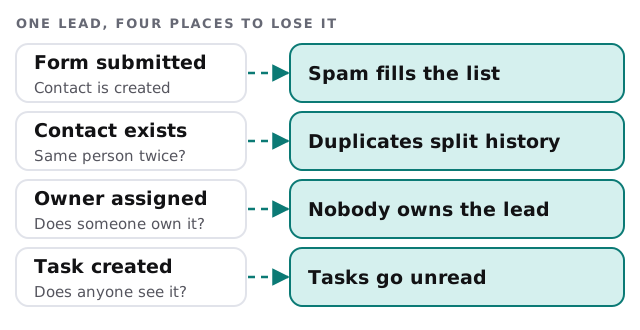
Findings and fixes
| What we find | What usually fixes it | The risk |
|---|---|---|
| The same person on three records | Merge with agreed rules | Merging is permanent |
| Leads with no owner | A routing rule plus a one-off cleanup | Giving them to the wrong rep |
| A dozen near-identical properties | Pick one, move the data, hide the rest | Reports that quietly used the old one |
| A workflow that emails the wrong people | Pause, read, rewrite | Pausing something others rely on |
Why the order matters
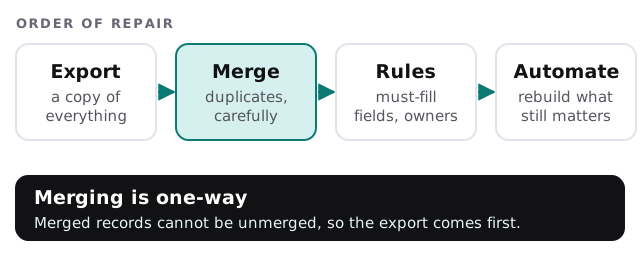
HubSpot is clear that a merge can’t be reversed. The merged record keeps the activities and associations of both originals, and by default the primary record’s property values win. If the wrong record wins, you have lost data you can’t recover from inside HubSpot. So the order is always the same.
What the end of a review looks like
Picture the Monday pipeline meeting afterwards. The report on the screen has one row per deal, each with an owner. Someone asks why a deal is stuck, and the notes are on the record rather than in a head. Nothing about that is clever. It is what the account was meant to do all along, and a review is how you get back to it.
Questions to ask any HubSpot consultant
- What do you do before you change anything? The answer should include a full export.
- Will you tell me when something should be deleted rather than fixed?
- What do I get in writing at the end? A list of what changed and why, not just a thank-you.
- Do you recommend a bigger plan or more seats? A good one asks what you use before suggesting more.
- When would you tell me HubSpot is the wrong tool?
What we need from you
- Admin access to the account, with an owner of the account on the call.
- One or two people who use HubSpot every day and will say what annoys them.
- Permission to export a copy of your records before we touch them.
If what you need is someone to keep an account tidy month after month, that is HubSpot admin support. If the real problem is a system outside HubSpot, such as accounting, the answer may be a connection to it.
A review that ends with “delete these” is worth more than one that ends with “buy that”.