A HubSpot account on its own only knows what people type into it. The invoice lives in accounting, the ticket in a help desk, the booked call in a scheduler, the order on the website. HubSpot integration services close those gaps, so a salesperson opening a contact sees the whole customer without asking three colleagues.
Pick the route before the tool
Every connection starts with the same question: who should be in charge of this data? Once that is settled, there are four honest ways to do it.
| Route | Good for | Where it strains |
|---|---|---|
| A ready-made connection | A common app with a standard flow | Unusual rules, such as when to bill |
| An automation tool | Simple flows that move one record when something happens | High volume, loops, long chains |
| A custom build on HubSpot’s API | Your own rules, high volume, sensitive data | Needs someone to maintain it |
| Importing a file | A one-off load | Anything you need to stay current |
Our comparison of Zapier and a custom integration goes deeper on the middle two. For one common pair there is a page of its own: the HubSpot and QuickBooks integration.
Where the connections go
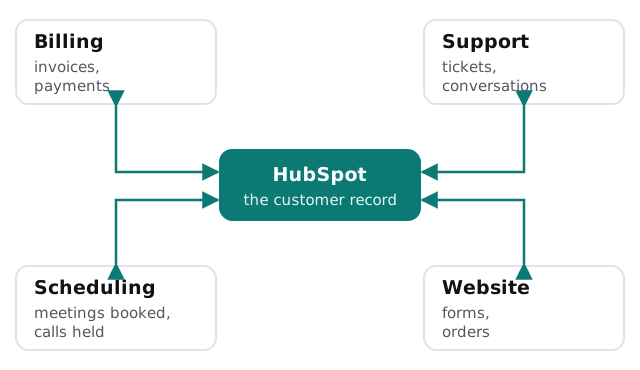
- Billing. Won deals become customers and invoices; paid status comes back to the deal.
- Support. Open tickets show on the contact, so sales doesn’t pitch someone who is angry.
- Scheduling. A booked meeting creates or updates the contact; see calendar booking into the CRM.
- Website. Forms and orders create records that are matched, not duplicated; see website forms into the CRM.
Access should be as small as the job
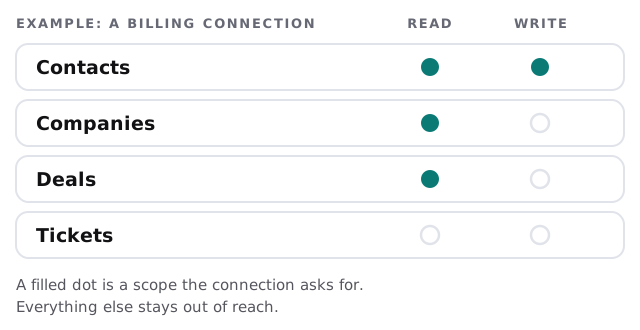
Custom connections to HubSpot run through its API. HubSpot’s developer documentation says a private app gets its own access token, sent in the Authorization header as a Bearer token, and that you authorize what each app can request or change. Those permissions are called scopes.
One thing to know before a build
As of October 26, 2026, HubSpot says legacy private apps can no longer be created. Existing ones keep working, though they don’t get the latest app features, and the docs direct new work to the new developer platform. If you already have a connection built on a private app, it isn’t urgent. If someone proposes a new one, ask which kind they are building.
What a sound build includes
- A field map. Every field, which system owns it, and which way it flows.
- A match step. Look up the record before creating one, on a stable identifier.
- Errors that tell someone. A failed sync goes to a named person with the record attached.
- A secrets store. Tokens kept out of documents and chats, and rotated; HubSpot recommends every six months.
- A short handover. What is connected, what each connection may touch, and what breaks if an app changes.
Signs a connection has gone wrong
- A customer is emailed about an invoice they paid last week.
- The same company appears twice, once from the form and once from billing.
- A sync fails and nobody hears about it until a customer calls.
- The person who built the connection has left, and no one knows where its token lives.
Each of these is cheaper to prevent in the design than to find in the data.
What we need from you
- A list of the systems you want connected, and what breaks today without the link.
- Admin access to HubSpot and to each other system.
- Someone who can say who owns each field when two systems disagree.
We build AI tools and internal tools, and a person approves what they do. For an integration that means a human sees anything uncertain before it changes a customer record.
Connecting two systems is the easy part. Deciding which one is right when they disagree is the work.