Pipedrive setup for small business has a familiar trap. The tool is quick to start, so people click through the defaults, import a spreadsheet and invite everyone on day one. Three months later the pipeline has twelve stages and nobody can say what “Qualified” means. This page is about the first build, done in an order that avoids that. If you already run Pipedrive and it has gone sideways, you want a Pipedrive consultant instead.
Build it in this order
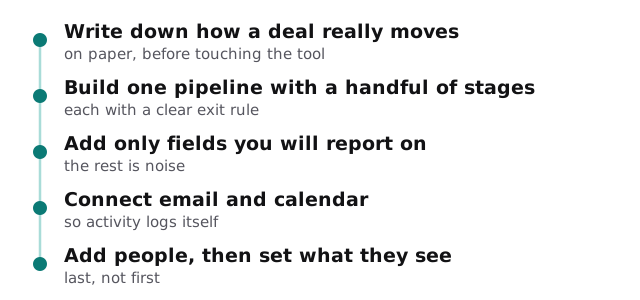
1. Describe a real deal
Pick the last three deals you won and write down every step from first contact to payment. The pipeline you build should be a tidy version of that, not a textbook one. Most small businesses need four to six stages.
2. One pipeline, clear stage rules
Give every stage an exit rule in plain words. “Proposal sent” means a proposal went out. It doesn’t mean “we talked about one”.
3. Fields you’ll report on
Ask of every field: will anyone filter or report on this? If not, leave it out. You can always add one later. Removing a field people have already learned to ignore is harder.
4. Connect the inbox and calendar
So calls, emails and meetings log themselves instead of being typed in. If new leads arrive from a web form, see website form to CRM automation.
5. Add people, then set what they see
Add salespeople only after the structure is settled.
Check your plan against your needs
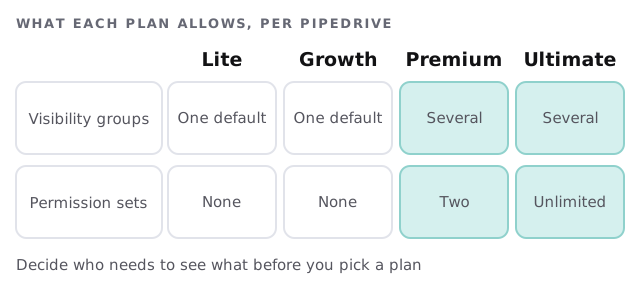
Pipedrive’s help center spells out what the plans allow for visibility and permissions. It’s worth reading before you buy, not after.
| You need | What it means in practice |
|---|---|
| Everyone sees every deal | The one default group is enough |
| A contractor sees only their own deals | You need visibility groups, so check the plan |
| Only managers can delete or export | You need custom permission sets, so check the plan |
Mistakes a first build avoids
- Copying a big team’s pipeline. A ten-stage template built for a large sales floor slows down a team of three.
- Importing before the fields exist. Data lands in notes and has to be moved by hand afterwards.
- Inviting everyone before anyone has tried it. The first confusing screen then confuses the whole team at once.
- Skipping the owner. Every pipeline needs one person who decides when a stage changes.
What we need from you
- The last few deals you won and lost, in a sentence each.
- Your current contact list, however messy.
- Who will sell, and who will only watch.
- The two or three numbers you want to see on Monday morning.
A week-one test
Before the whole team starts, one person runs a real deal through the pipeline start to finish. If they stumble at a stage, the stage is unclear. If they skip a field, it probably shouldn’t exist. Fix those before anyone else logs in.
Questions to ask any Pipedrive setup provider
- Will you build from my process or from a template?
- How many fields will I be asked to fill in per deal?
- Who sets visibility, and can I change it later?
- What do I get written down at the end?
Prefer to try it yourself first? Our guide to setting up Pipedrive for your team covers adding users and setting visibility. When you’d like help, we start with the free IT check, then give you a plan and a fixed quote.
Start with the smallest pipeline that tells the truth. You can always add a stage. You can’t easily win back a team that gave up on a cluttered one.