It is 8:40 on a Monday. A customer rings your main number. Who hears it first: a greeting, a person, or a menu that sends them to the wrong desk? Nobody notices the answer until it is wrong. That is why RingCentral setup for small business works best as a short design exercise before anyone opens the Admin Portal. The software does what you tell it. The work is knowing what to tell it.
The default that surprises people
RingCentral’s own help page says the company schedule defaults to all hours of the day and night. That means one routing plan applies all day, every day, including Sunday night. To treat open and closed hours differently, you first set a business-hours schedule, then build a second set of rules for the closed periods.
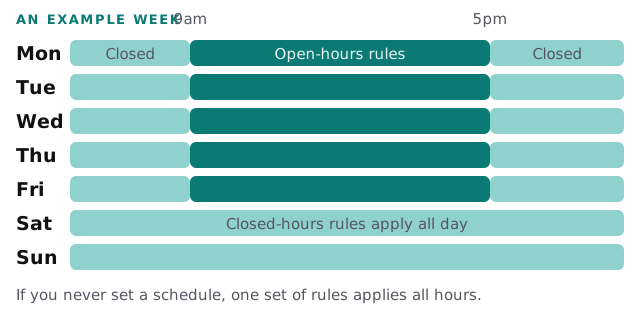
RingCentral also notes that company hours are separate from each person’s own work schedule. Changing your company hours does not change when an individual is shown as available, so check both.
Pick a destination for every rule
Each rule sends a call somewhere. RingCentral’s call handling page lists the choices, and the real decision is which one fits each moment of your day.
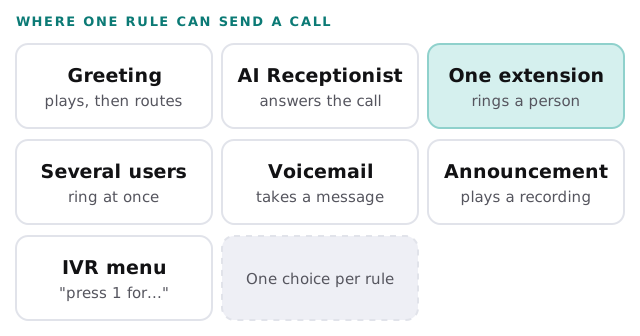
| Moment | A sensible choice | Watch out for |
|---|---|---|
| Open hours, small team | Greeting, then several users ring together | Everyone’s phone ringing at once gets old fast |
| Open hours, one front desk | One extension, with a fallback | The fallback is forgotten until the desk is empty |
| Lunch or a staff meeting | Voicemail or an announcement | A greeting that promises a call back needs someone to make it |
| Closed hours | Greeting and voicemail | Someone has to listen to the voicemail |
| A holiday | A custom rule in the Admin Portal | Easy to forget until the day itself |
The order we work in
- Write down the calls you get. Sales, existing customers, suppliers, wrong numbers. Count roughly how many of each in a normal week.
- Name who handles each kind. A person, not a department.
- Set the business hours. Real hours, plus the holidays you already know about.
- Build the open-hours rule first. Greeting, then routing.
- Build the closed-hours rule. On the apps this sits on the Closed hours tab. In the newer Admin Portal layout, RingCentral calls it after-hours call settings.
- Record the greeting. Short, with your business name, and no menu longer than a caller can remember.
- Test from outside. Ring from a mobile and a landline, in hours and out of hours.
Single site or several
RingCentral says admins need Auto Receptionist permission in the Phone System to change these settings. A single-site account can use the apps or the Admin Portal. A multi-site account has to use the Admin Portal and manage call handling per site. If you have two offices, decide early whether they share a greeting or keep their own, because the answer changes how the hours are set up.
Mistakes we tidy up
- The schedule was never set, so the closed-hours rule never fires.
- The greeting says “press 2 for service” and nobody checked that extension 2 rings anywhere.
- Business hours are right but holiday dates were not entered.
- The AI Receptionist is built but not connected to the number. RingCentral says calls follow your existing call handling rules unless it is attached to a number or extension.
- Only one person knows the admin login.
Rather work through the basics first?
If you are also moving files or chat at the same time, our pages on Microsoft Teams setup for small business and Google Voice for business setup cover the neighbouring decisions. Ask us to review your plan, or to build it, when the call flow has more branches than you can keep in your head.
What we need from you
- Your current business number, and who holds the account today.
- Your real opening hours and next few closures.
- A list of people and their extensions, with who covers whom.
- The calls you most want answered by a human.
Draw the call on one sheet of paper before touching a setting. If you cannot draw it, you cannot test it.