A Windows 10 end of support upgrade for business is no longer a someday project. Microsoft ended support on October 14, 2025. The computers didn’t switch off that day, and most of them still boot every morning. What stopped was the flow of security fixes, quality updates and technical support, which means every month since has added holes that won’t be patched.
For a business holding client information, that’s the real problem. Not the operating system itself, but the fact that nobody is fixing it anymore.
Can this computer run Windows 11?
Microsoft publishes the minimums. A machine has to clear every one of them:
| Part | Windows 11 minimum |
|---|---|
| Processor | 1 GHz or faster, 2 or more cores, on a compatible 64-bit processor |
| Memory | 4 GB |
| Storage | 64 GB or more |
| Firmware | UEFI, Secure Boot capable |
| Security chip | TPM version 2.0 |
| Graphics | DirectX 12 or later, with a WDDM 2.0 driver |
| Screen | 720p, larger than 9 inches diagonally |
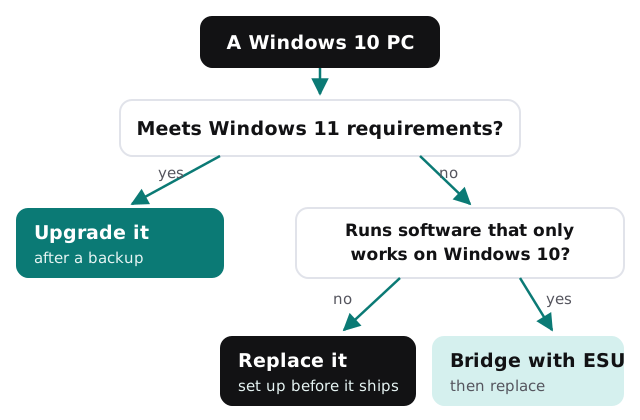
Microsoft’s PC Health Check app runs the same test on each machine and tells you which line it fails. Older business computers most often trip on the processor or the TPM line, and those aren’t things you can fix with an upgrade.
If you need more time: Extended Security Updates
Some machines can’t move yet, usually because they run a piece of software that hasn’t been certified for Windows 11. For those, Microsoft sells Extended Security Updates:
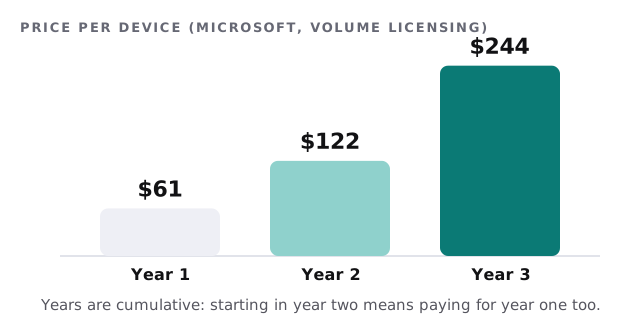
- Paid per device, bought through volume licensing, one full year at a time.
- $61 per device for year one, doubling every year, for a maximum of three years.
- Cumulative: buy in year two and you pay for year one as well.
- Security fixes only. No new features, and no general technical support.
- The device has to be on Windows 10, version 22H2.
Treat it as a bridge for one or two machines with a real reason to wait, not a plan for the whole office.
Microsoft also includes Extended Security Updates at no extra cost for Windows 10 running as a cloud PC in services like Windows 365 and Azure Virtual Desktop. For one stubborn application, moving it to a cloud machine can be tidier than keeping an old PC alive in the office.
How the upgrade runs
- Inventory. Every Windows 10 computer, who uses it, and what it’s for.
- Compatibility check. Each machine against the Windows 11 minimums.
- Backup. Files and settings saved before anything changes.
- One test machine. Upgrade a single PC and run the software your business can’t live without.
- Upgrade the passes. After hours, a few at a time, so nobody loses a working day.
- Replace the fails. New computers are set up before they reach a desk, so the swap takes minutes.
- Retire safely. Old drives are wiped before machines are recycled or sold.
- Write it down. A current list of every machine, its version and its owner.
What to tell your team
People worry about upgrades more than they need to. A short note before the work starts saves a lot of questions:
- When their computer will be upgraded or swapped, and that it happens outside working hours.
- That their files and settings come across, and where to look if something seems missing.
- What looks different in Windows 11, mainly the centered taskbar and a new Start menu.
- Who to contact on the first morning if anything doesn’t work.
A computer that can’t run Windows 11 is usually old enough that its battery, drive and fan aren’t far behind. Replacing it now often costs less than nursing it along.