Here’s what the Tuesday after go-live looks like when the project went well. A rep finishes a call, opens the deal in Zoho CRM, changes the stage and logs the next step. The owner opens one dashboard and sees the pipeline. Nobody asks “where’s the latest version of that list?” That outcome is what a Zoho CRM implementation is for, and Zoho CRM setup alone doesn’t get you there. Plenty of accounts are technically set up and still unused.
If you already run Zoho and it has gone wrong, you want a Zoho CRM consultant to review it instead. This page is for the first build.
The project, in order
- Map how you sell. Before touching Zoho, we write down how a lead becomes a customer in your business, including the messy parts. This becomes the pipeline.
- Decide what to track. Every field is something someone has to fill in. We keep the ones you’ll report on and skip the rest.
- Build the structure. Pipeline stages, fields, layouts, and the roles and profiles that decide who sees what.
- Clean and import the data. Merge duplicates, fix formats, then load contacts, companies and open deals. If your data lives in spreadsheets, our Excel to CRM migration page covers that part in more depth.
- Connect the email and forms. Web forms and inboxes feed the CRM, so records arrive without anyone typing them. For the web form side, see website form to CRM automation.
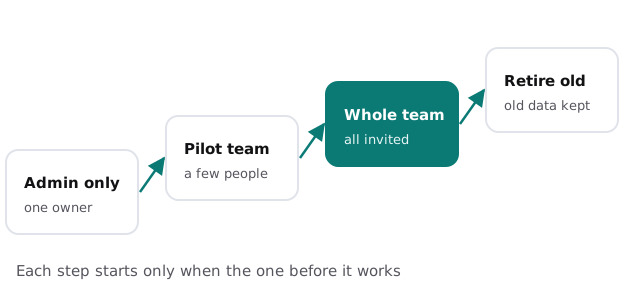
- Pilot with a few people. They use it for real work, and we fix what they trip over.
- Roll out and retire the old way. Everyone gets invited, and the old spreadsheet becomes read-only.
Who does what
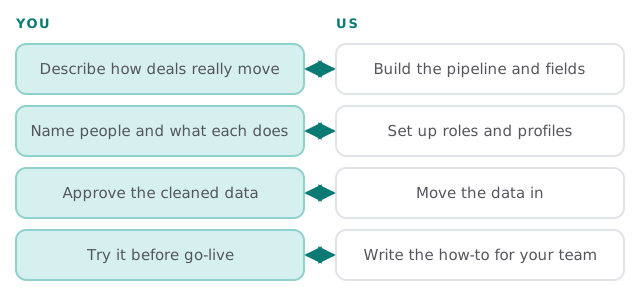
| You | Us | |
|---|---|---|
| Pipeline | Describe how deals move | Turn it into stages and rules |
| Data | Approve what moves and what stays | Clean, match and load it |
| People | Decide who does what | Set roles and profiles |
| Training | Give people an hour to try it | Write the short how-to for your team |
Getting people in without a mess
Roles and profiles come before users. Zoho’s help center says the profile controls which features a user can access, while the role controls which records they can see, and that both must be set up before you add or import users. After that:
- Bulk import from .xls, .xlsx or .csv works for up to 1,000 users at a time.
- The number actually added depends on your edition and available licenses.
- Invitations expire after 7 days, so send them when people are ready.
What we need from you
- One decision-maker who can say yes or no quickly.
- Your current lists, spreadsheets or exported data, even the ugly ones.
- A rough picture of what you want to see on the owner’s dashboard.
- A pilot group willing to tell us what’s confusing.
Common reasons a Zoho rollout stalls
- Too many fields. People skip the form when it has forty boxes.
- No owner. Nobody is responsible for the pipeline, so it drifts.
- Everyone starts the same day. The first bug hits everybody at once.
- The old tool stays open. If the spreadsheet still works, people use it.
Rather start with the basics yourself? Our guide to setting up Zoho CRM for your team covers users, roles and profiles. When you want a plan and a fixed quote for the whole rollout, start with the free IT check.
A CRM project ends when the old spreadsheet stops being opened, not when the last field is built.