Most people expect a phone system to be hard and are surprised at how quickly Zoom Phone’s first screen goes by. Zoom Phone setup for small business is quick because the software makes the plain choices for you: a default receptionist, a default operator, a default emergency address. The risk is that defaults look like decisions. Here is what the setup does, what it leaves to you, and how to know it works before a customer finds out.
What the setup wizard does
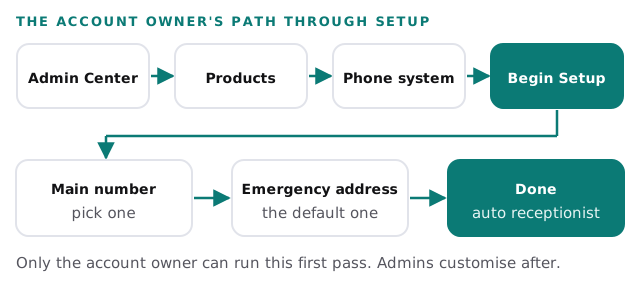
Zoom’s admin article lists the initial steps, and says the account owner has to do them:
- Open the Admin Center. Sign in to the Zoom web portal and choose Admin Center from your profile.
- Go to the phone settings. In the side menu, open Product configuration, then Phone system.
- Select Begin Setup.
- Pick the main company number. You can filter by country, state and area code, and enter an extension for the account owner.
- Enter the default emergency address.
- Select Done.
What you get without asking
Zoom creates a default auto receptionist for your main company number, and assigns the account owner as its default operator. The auto receptionist answers with a recording and then routes the call. In practice, the owner is the person the system treats as the receptionist until you say otherwise. For a business owner who is also the sales team, that may be fine on day one. For a business with three people at a front desk, it is the first thing to change.
Hours and routing
Business hours are set in the account-level settings, and again on the main auto receptionist as you customise it. Decide the two separately. The account default says when you are open; the receptionist says what a caller experiences when you are not.
A menu, if you need one
Zoom lets account owners, admins and auto receptionist operators route an auto receptionist to an interactive voice response menu, from Auto Receptionists under Phone system. Each key can leave a voicemail, forward the call, or open a dial-by-name directory. For a menu with several levels, Zoom advises building from the lowest level up, and assigning the top-level menu to the main number last.
Our view: a one-level menu with three options is plenty for most small firms. A fourth option usually means two of the others are really one.
Three things to decide before you start
| Decision | Why it matters | A common wrong turn |
|---|---|---|
| Who the account owner is | Only that role can run the initial setup, and it becomes the default operator | A founder’s personal login, so the system depends on one person |
| The emergency address | Zoom says first responders use it when an emergency number is dialled | A head-office address used for a remote team |
| Which licence people hold | Zoom says setup needs a Zoom Workplace licence with Phone included, or a standalone Phone calling plan | Buying seats before checking who actually takes calls |
Zoom also lists a Pro, Business or Enterprise account as a requirement, so confirm what you have before you plan.
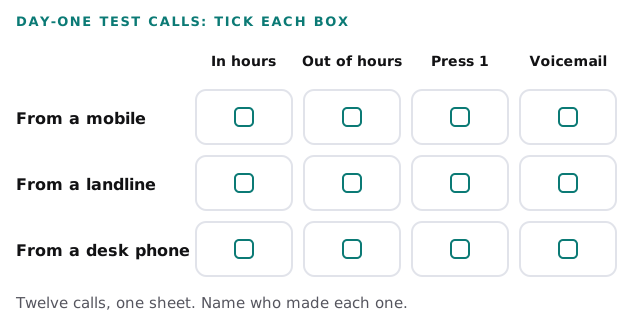
The test sheet we run on day one
Calls fail in particular combinations: a mobile caller, out of hours, a particular menu key. Test every combination before you announce the new number.
What usually goes wrong
- The owner is still the default operator a month after launch.
- The greeting names hours that changed.
- Voicemail lands somewhere nobody checks.
- Staff move desks and the emergency address is never updated.
- The old number is cancelled before the new one has proven itself.
Moving from another system
If you are comparing options or coming from another provider, our pages on Google Voice for business setup and RingCentral setup for small business cover the same planning for those tools. For video and chat on the Microsoft side, see Microsoft Teams setup for small business. We can do the planning, the setup and the test sheet together, so the phones are checked before staff depend on them.
What we need from you
- Your current number and who holds the account.
- Names, extensions and desk or mobile preferences for each person.
- Your hours, plus any holiday closures coming up.
- Who covers whom when someone is away.
Setup takes minutes. Knowing what a caller hears at 5:01pm is the real work.