Key takeaways
- The emails worth counting are routine replies: questions your team has answered many times before.
- Yearly cost is the hours a week spent on those replies, times what a staff hour costs, times 50 weeks.
- Slow replies cost money too. An enquiry that waits can go to a competitor who answered first.
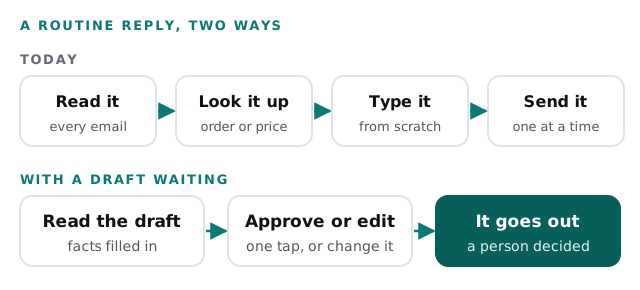
- Look for a tool that drafts the reply and lets a person approve it, not one that sends on its own.
Time spent on email is a cost you can carry for years without ever measuring it. It doesn’t feel like a cost. It feels like the job. A customer asks where their order is. A supplier wants a delivery date confirmed. A new enquiry asks what you charge. Each reply takes a few minutes, so nobody thinks twice about it.
Those minutes add up. This post helps you count them, turn them into dollars and decide whether they are worth getting back. You will also see what a slow reply costs, which is the part that never shows up in anyone’s week.
The emails this is about
Not every email is worth worrying about. Some need your judgment, and they always will. The ones that cost you are the routine replies, where your team looks something up and types out an answer they have written many times before.
| Routine reply | Needs a person |
|---|---|
| Where is my order? | A customer is upset about a mistake |
| Are you open on the holiday? | A supplier wants to change terms |
| Can I move my appointment to Thursday? | A legal or insurance question |
| What does a standard job cost? | A quote for something you’ve never done |
| Did you get my payment? | Anything where the facts are in dispute |
If most of your inbox looks like the left column, there is time to get back. If it looks like the right column, the inbox is doing its job and you can stop reading here.
How big the pile really is
Microsoft studies how people use its own work software. In 2025 it reported that the average worker it measured receives 117 emails a day, and skims most of them in under a minute. It also found that people using Microsoft 365 are interrupted every two minutes by a meeting, an email or a notification (Microsoft, 2025).
An earlier Microsoft report split the working day in two. People spent 57 percent of their time communicating, in meetings, email and chat, and 43 percent creating things like documents and spreadsheets (Microsoft, 2023).
Those are averages across large numbers of workers. Your team will be different, which is why the next step is to count your own.
Count your own week
Pick a normal week, not the busiest one and not the quietest one.
- Ask everyone who answers customer or supplier email to keep a tally for five working days.
- They make one mark for each routine reply, the kind in the left column above.
- Next to each mark, they jot a rough time, including the minutes spent looking things up.
- At the end of the week, add up the minutes for each person and divide by 60.
People tend to say “a couple of minutes each”. The lookup is where the time hides. Checking an order in one system, a price in another and a delivery date in a third can turn a two-minute reply into ten.
Turn the hours into dollars
The math is the same one we use everywhere on this site. Hours a week, times what an hour of staff time costs, times 50 working weeks. Then add what slow replies cost you.
For the hourly cost, remember it is more than the wage. In June 2026, private employers paid an average of $46.89 per hour worked, of which $32.82 was wages and the rest was benefits (BLS). The example below uses $35, the same cautious starting guess our free IT check uses.
These example numbers are invented for illustration. Change them to yours in the calculator underneath.
| Line | Example |
|---|---|
| People who answer routine email | 5 |
| Hours a week each on routine replies | 2 |
| Hours a week across the team | 10 |
| Cost of a staff hour | $35 |
| Reply time for the year (10 × $35 × 50) | $17,500 |
| Enquiries lost last year to a slow reply | 4 |
| What one lost enquiry was worth to you | $500 |
| Lost enquiries for the year (4 × $500) | $2,000 |
| Total for the year | $19,500 |
The cost nobody counts: slow replies
Reply time is the steady cost. The slow reply is the expensive one, because you never see the customer you lost. They just stop writing.
In a Harvard Business Review study of how companies handle online enquiries, the authors’ finding was blunt: most companies are not responding nearly fast enough (HBR). That fits what you probably know from the other side. When you ask three businesses for a quote, the one that answers first gets a head start.
Here is one way a slow reply happens in a small team. The enquiry lands while everyone is busy with work that pays today. It needs a price from one place and an availability check from another. So it waits until someone has a quiet moment, and by then the customer has moved on. Nobody did anything wrong. The reply was simply harder to write than it should have been.
That is why the lost-enquiry line belongs in your math. Be honest with it. If you can think of four enquiries last year that went quiet after a slow answer, put four.
Why most inbox tools don’t fix this
There is no shortage of software that promises to tame your inbox. Three kinds are worth knowing about, and each misses the real problem in its own way.
A new inbox. Shared-inbox and help desk apps tidy up who answers what. That helps. But your team still looks up the order, still checks the price and still types the reply. The lookup is where the minutes went, and it hasn’t moved.
Templates. Saved replies sound like a fix. The risk is that they go stale. The price changes, the policy changes and nobody updates the template. Soon your team is editing every template so heavily that it would be quicker to start fresh.
A bot that answers on its own. Some tools reply to customers with no person in between. That’s fast. It’s also risky, because the bot doesn’t know when a routine question is really a complaint. One wrong answer sent in your name can cost more than a month of saved minutes.
Each of these is also one more subscription and one more login. And none of them is built around your facts: your orders, your prices, your calendar.
What to look for instead
The fix that works is narrow. It handles the routine replies, uses your real facts and leaves every decision with a person.
| Look for | Be wary of |
|---|---|
| Drafts that pull facts from the systems you already use | Templates someone has to keep updating by hand |
| A person approves every reply before it goes out | Replies sent with nobody checking |
| It starts with your most common question | A tool that tries to handle every email on day one |
| You try it on your real inbox before relying on it | Trusting it before you’ve seen it on your own email |
| Anything unusual goes straight to a person | A system that guesses when it isn’t sure |
Then measure again. After a month, ask your team to repeat the tally for one week. The difference in hours, times your hourly cost, times 50, is what the change is worth. If you want more detail on this kind of setup, our page on an AI executive assistant for business owners covers it, and so does our page on AI email triage for shared inboxes.
An assistant we built, from the inside
We built an AI assistant that works this way. It drafts replies to incoming email, and each draft waits on an approvals screen until someone taps Approve or opens it to edit. It can also answer questions about sales, orders and cash from the apps it is connected to. It’s a working demo, shown here on sample data.
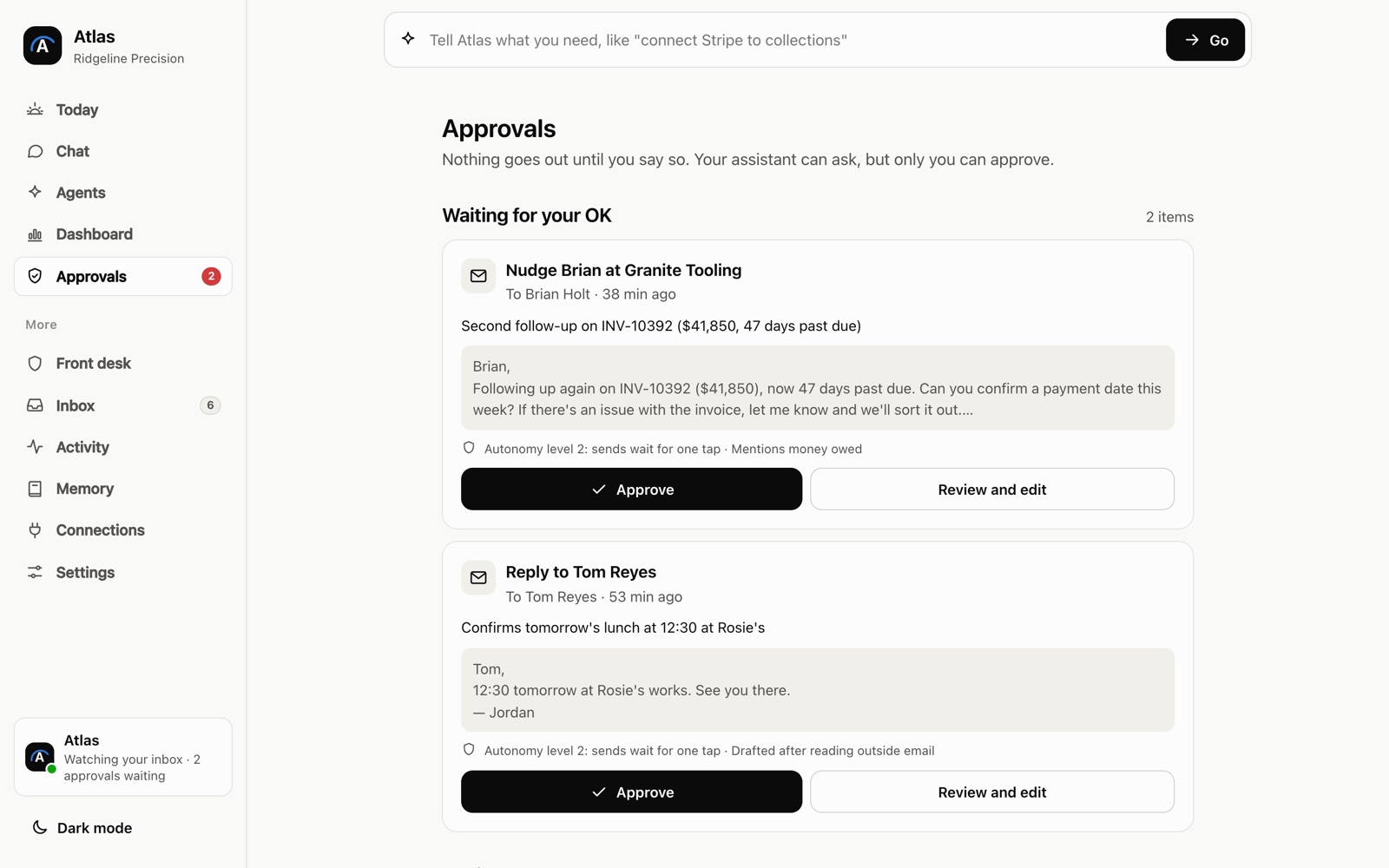
The interesting part is not the screen. It is how the assistant gets the facts it puts in a draft, and where a person stays in charge. That is easier to show than to describe.
Behind the scenes
Want a behind-the-scenes walkthrough of a real build?
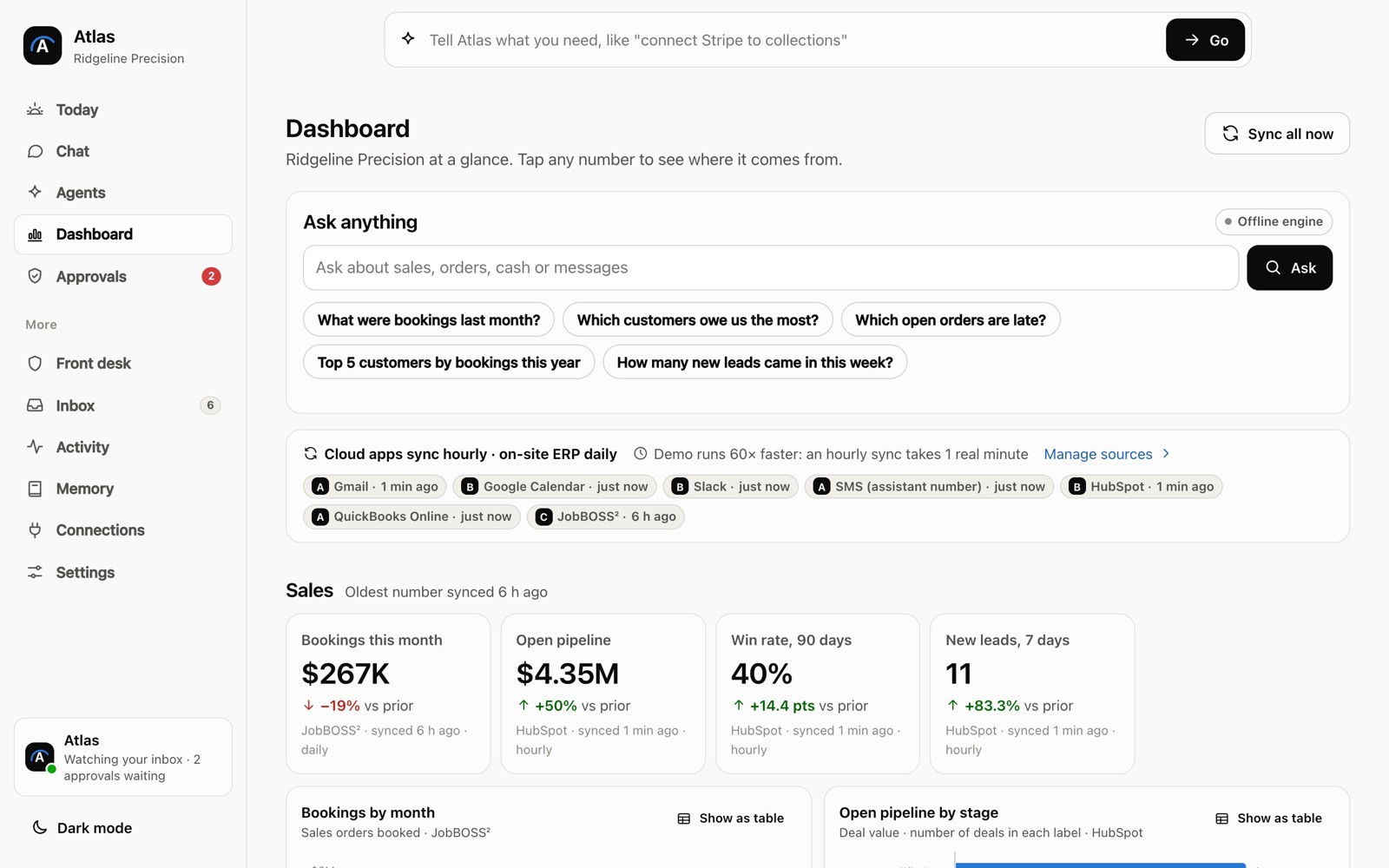
We will take you through it screen by screen: what each person sees, how a record moves through it, and why we built it that way. Then we can talk about the task that costs you most.
Frequently asked questions
Which emails are safe to hand to an AI assistant?
Ones that follow a pattern and draw on facts you already keep, like order status, opening hours, quotes from a price list or booking changes. Anything with a complaint, a legal question or money at stake should still go to a person.
Will customers know a reply was drafted by AI?
They see what your team approves. A good draft uses your facts and your usual wording, and a person reads it before it goes out. You can edit any draft or write the reply yourself.
How do I find out how long my team spends on email?
Ask each person to keep a tally for one normal week. A mark for every routine reply and a rough time for each is enough. One honest week beats any average from a survey.
Sources
- Breaking down the infinite workday (Microsoft Work Trend Index, June 2025)
- Will AI Fix Work? (Microsoft Work Trend Index, May 2023)
- The Short Life of Online Sales Leads (Harvard Business Review, March 2011)
- Compensation costs for private industry workers averaged $46.89 per hour worked in June 2026 (U.S. Bureau of Labor Statistics)
About the author
Andy Kang, AI Partner Team. Andy Kang writes the blog for AI Partner Team, which builds AI tools and internal apps for small businesses alongside managed IT and IT projects. The blog shows the math and the reasoning behind that work, so you can check it against your own business.
- Every fact links to the page it came from, listed under Sources.
- Example numbers are labelled as examples, and you can swap in your own.
- Builds are shown on sample data, with no client names or client figures.