A dental practice holds more sensitive information than most small offices: histories, insurance numbers, X-rays, payment details. It also runs a surprising number of systems to hold them. IT consulting for dental offices is the work of listing those systems, asking what could go wrong with each, and writing down what you decided to do about it.
We are not lawyers and we do not certify anything. What we can do is explain what the rule says in plain words and help you build the evidence.
What the rule asks for
The HIPAA Security Rule applies to covered entities. Its administrative safeguards include a risk analysis, described as an accurate and thorough assessment of the potential risks and vulnerabilities to the confidentiality, integrity and availability of electronic protected health information. They also include risk management: implementing security measures sufficient to reduce those risks to a reasonable and appropriate level.
A contingency plan sits beside them. It has three required parts: a data backup plan, a disaster recovery plan and an emergency mode operation plan. In a dental office, those translate into everyday questions. Can you retrieve exact copies of patient data? Could you restore it? Could the schedule run if the server did not?
The paper it leaves behind
The consulting work produces four documents. They are modest, but together they answer the question an auditor, an insurer or a buyer of your practice will one day ask.
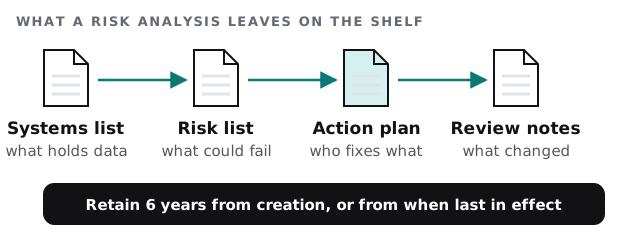
The rule’s documentation requirement says to maintain policies and procedures in written form, which may be electronic, to retain them for 6 years from creation or last effect, and to review them periodically. That is why the review notes matter as much as the first version.
Four projects a review often produces
Backups you have actually restored
A backup that has never been restored is an assumption. The project is a test restore, a note of how long it took, and an agreed order for what comes back first.
Imaging storage
Digital radiographs add up. The review looks at where images live, who can open them, and how they would be recovered. Our notes on managed IT for dental offices cover the day-to-day side.
A vendor and software review
Practice management, imaging, patient messaging, e-claims. Each vendor holds some of your data. The review lists them, who the contact is, and what you would do if one stopped working.
Access by role
The front desk does not need the same access as the dentist. We map who can see what, and take away what nobody uses.
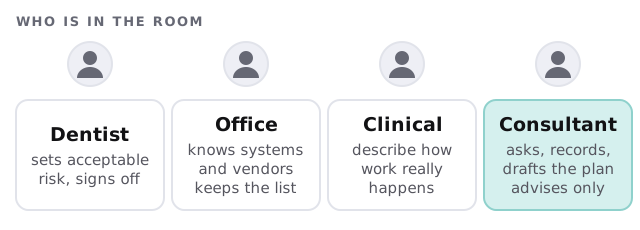
Who is in the room
A Tuesday after the review
The practice manager gets a call from the imaging vendor about an update. Before, she would have said yes and hoped. Now she opens the systems list, sees which workstations talk to that server, and checks the action plan for who approves changes. The update goes ahead on a Wednesday lunch hour, after a restore point is taken. Nothing dramatic happens, which is the point.
What a good first engagement looks like
- A systems list built from a walk through the office, not a form.
- A short, ranked list of risks, described without jargon.
- Three or four projects, each with a plan and a fixed quote before anything starts.
- A date for the next review, written on the plan.
If you are weighing automation for recalls and treatment follow-up instead, see AI automation for dental offices.
A risk analysis is not a one-time chore. It is the dated record that you looked, decided, and acted.
What we need from you
- A walk-through with the office lead.
- A list of the vendors and software you use, including the ones the hygienists chose.
- Any earlier risk analysis or IT notes, however old.
- A decision-maker who will sign off on the plan.