Salesforce can model almost any sales process. That is its strength, and the reason a small business can lose a great deal of time to it. A good Salesforce implementation for small business is the opposite of a grand design: it picks the smallest version of your process that people will use every day, builds exactly that, and stops.
The release, in rings
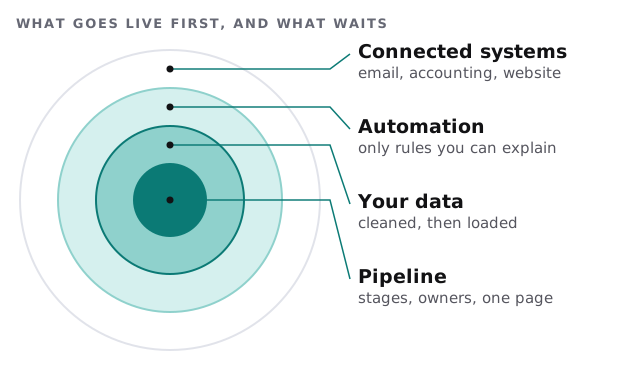
The centre is the pipeline. If your team can’t work a deal from first contact to won, with the right owner and next step visible, nothing outside it will help.
Phases of the project
1. Describe how you sell
We sit with the people who sell and write the process as short sentences. What is a lead? When does it become an opportunity? What has to be true before a deal is won? Many implementations fail here by skipping it.
2. Shape Salesforce around it
Stages, page layouts, required fields and record ownership are set up to match those sentences. We keep to Salesforce’s standard objects, leads, accounts, contacts and opportunities, wherever they fit, and add custom fields only for something your reports need.
3. Set access by job
A rep sees their own deals and the team’s pipeline. A manager sees more. Someone in finance sees what they need to raise invoices. Access is set by role and reviewed with you, not copied from a template.
4. Bring the data
Your old list, whether a spreadsheet or another CRM, is cleaned, matched and loaded in order: accounts, then contacts, then opportunities. See CRM data migration for small business for how we handle matching, and Excel to CRM migration if the source is a spreadsheet.
5. Test with real deals
Your team works actual deals in the new system while we watch. We are looking for the moments when someone asks “where do I put this?”
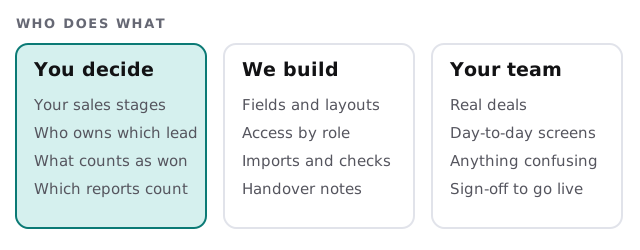
Who does what
Signs you are ready for Salesforce
- Your sales process has more than one handoff, such as an estimator, a salesperson and an account manager.
- You need reports that cut your pipeline several ways, and a spreadsheet can’t keep up.
- More than a handful of people need to work the same customer list at once.
- You already know the three or four connections you will want within a year.
If most of those are false, a simpler tool may suit you better, and we will say so before you commit.
In the first release, and not yet
| In the first release | Added later, once the basics hold |
|---|---|
| One pipeline | A second pipeline for a new service |
| Leads, accounts, contacts, opportunities | Custom objects |
| Reports your owner actually uses | A wider dashboard set |
| One or two simple rules, such as lead assignment | Larger automations |
| A form that creates leads | Connections to accounting, email and scheduling |
When you get to connections, website forms into the CRM and QuickBooks and CRM integration are the usual first two.
What we need from you
- A named person who can answer “what do we mean by that?” quickly.
- Your current customer data, and anyone who knows its quirks.
- Two or three people from sales willing to test and be honest.
- A decision on who will administer Salesforce afterwards.
We deliver a plan and a fixed quote after a free IT check, so the scope is agreed before work begins.
Before you commit
Is Salesforce actually the right tool? Some teams are better served by something lighter. Our guide to setting up Salesforce for your team shows what day-to-day use feels like, and a custom CRM is the alternative for a process that is truly your own. If you already run Salesforce and it has gone wrong, a Salesforce consultant review is the better fit.
Build the smallest Salesforce your team will use daily. Everything else can wait for them to ask.